8 Mobile Security and Utility Apps Tested in 2026: What You Need—and What You Can Delete
Your phone probably does not need a digital janitor.
Modern Android devices already manage memory, suspend unused apps, remove temporary files, scan installed software, and restrict excessive background activity. Google explicitly advises that users do not need to keep closing recent apps to avoid running out of memory or battery because Android handles those resources automatically.
Yet app stores remain packed with “RAM boosters,” phone cleaners, Wi-Fi protectors, antivirus suites, app lockers, file managers, and PDF readers.
Some of these tools solve real problems. Others mainly replace a built-in feature with a more colorful interface, more notifications, and occasionally more advertising.
To find out which category each app belongs to, the ToolOnline editorial team evaluated eight popular mobile security and utility apps through practical everyday tasks. We focused on one central question:
Does this app remove meaningful friction, or does it create another background process to manage?
Quick Verdict
-
Brave was the most useful daily privacy upgrade, but it is not a VPN and does not secure traffic from other apps.
-
Speedtest remained valuable because connection problems are easier to diagnose with measurements than guesses.
-
A capable file manager was useful for archives, downloads, network storage, and manual cleanup.
-
App-locking software was helpful on shared devices, although newer Android devices may already include Private Space.
-
Instabridge was useful during travel, but a community-listed hotspot should never be treated as automatically trustworthy.
-
Avast One provided additional scam, link, and malware tools, but many careful users may already be adequately served by Play Protect and safe installation habits.
-
Cleaner apps offered the least improvement over modern Android’s native storage controls.
-
A lightweight PDF reader was useful only when it opened documents more quickly or offered features missing from the built-in viewer.
Performance and Utility Summary
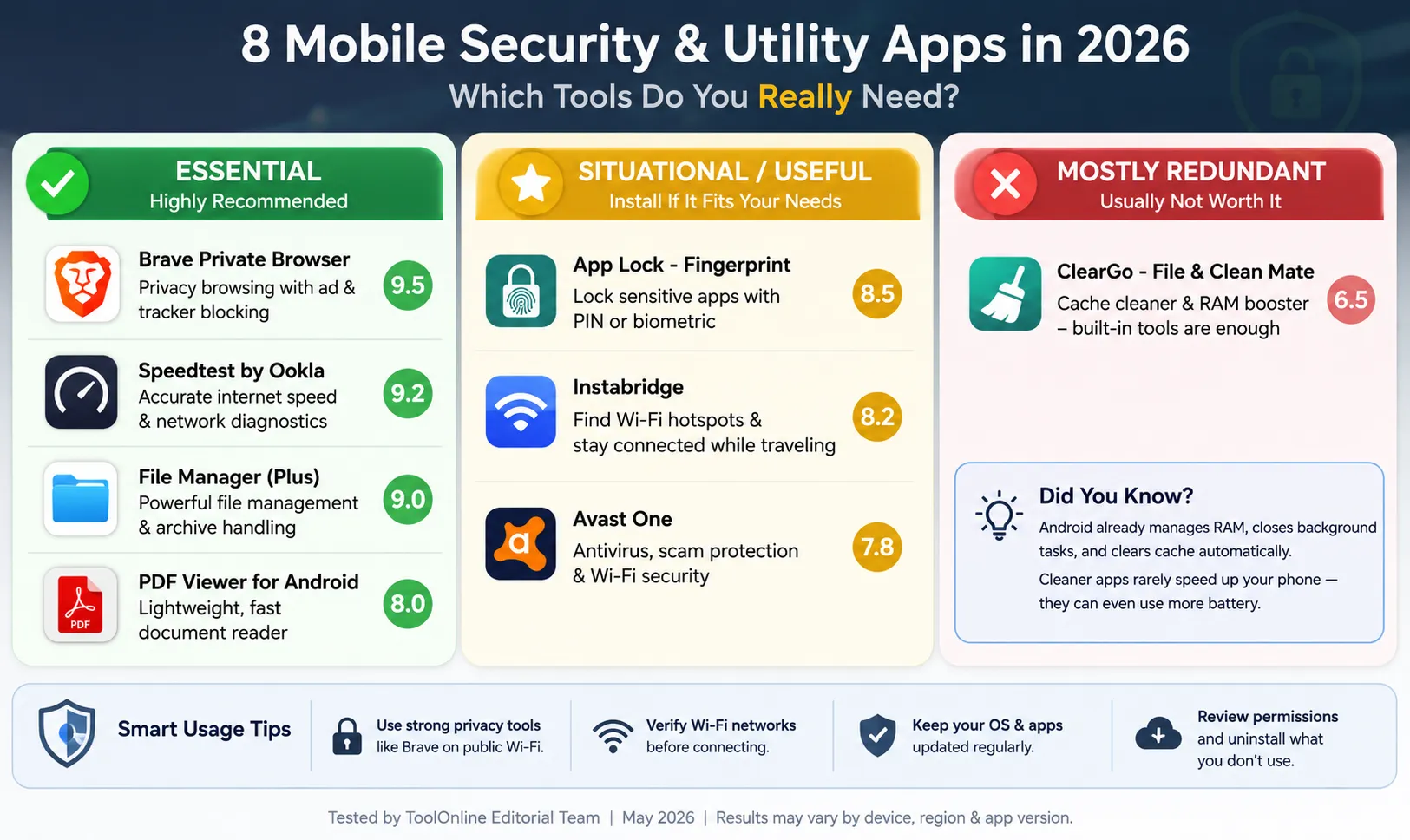
| App | Primary purpose | Resource level observed | Utility score | Our verdict |
|---|---|---|---|---|
| Brave Private Browser | Private browsing and tracker blocking | Moderate | 9.3/10 | Worth installing for privacy-focused browsing |
| Speedtest by Ookla | Network diagnostics | Low | 9.1/10 | Useful when Wi-Fi or mobile data feels slow |
| File Manager Plus | File navigation and archive handling | Low to moderate | 8.8/10 | Useful for advanced file workflows |
| App Lock – Fingerprint | Restricting access to selected apps | Low | 8.1/10 | Useful mainly on shared or older devices |
| Instabridge | Finding listed Wi-Fi hotspots and travel connectivity | Moderate | 7.9/10 | Situational but useful for travelers |
| Avast One | Malware, scam, link, and Wi-Fi checks | Moderate to high | 7.6/10 | Additional protection for higher-risk users |
| ClearGo – File & Clean Mate | Storage cleanup | Low to moderate | 6.2/10 | Mostly redundant for careful users |
| PDF Viewer for Android | Opening and reading PDF files | Low | 7.7/10 | Useful only if the native viewer is inadequate |
These are editorial utility scores, not independent malware-detection laboratory ratings. App size, battery use, features, and pricing can vary by device, Android version, region, subscription plan, and app release.
How We Evaluated the Apps
We did not rank these tools by counting how many features appeared on their product pages.
Instead, we used tasks that reflected why someone would realistically install each app.
Test tasks
We evaluated whether the apps could help us:
-
Identify why a Wi-Fi connection felt slow
-
Find large files and forgotten downloads
-
Extract and open ZIP archives
-
Restrict access when handing a phone to another person
-
Connect during travel without repeatedly searching for networks
-
Detect suspicious links or sideloaded installation files
-
Clear storage without damaging useful data
-
Open a PDF quickly without intrusive advertising
For security tools, we also examined the permissions requested, background behavior, notifications, and whether the app clearly explained what it was protecting.
1. Brave Private Browser: The Most Useful Everyday Privacy Upgrade
Brave was the easiest app in this comparison to justify keeping.
Its main feature, Brave Shields, blocks many cross-site trackers and other unwanted web content directly inside the browser. Brave can also attempt to upgrade supported webpage connections from HTTP to HTTPS. (support.brave.com)
Our test
We used Brave for normal browsing across:
-
News websites
-
Shopping pages
-
Recipe blogs
-
Travel sites
-
Pages containing cookie banners and embedded advertising
-
A public Wi-Fi connection with a captive login portal
We compared page clutter, loading behavior, broken elements, and the number of trackers reported by the browser.
What worked well
On advertising-heavy pages, Brave removed enough visual noise to make the improvement immediately noticeable.
Articles became easier to read, fewer elements shifted during loading, and the tracker counter provided a simple explanation of what the browser had blocked.
Unlike a separate ad-blocking extension, the feature was active immediately after installation and required little configuration.
Where the marketing can be misunderstood
Brave does not automatically encrypt every connection made by your phone.
Its browser protections apply mainly to activity inside Brave. Traffic from banking apps, social platforms, email clients, games, and other applications does not pass through Brave Shields.
HTTPS upgrades also depend on the website supporting a secure connection. Brave’s own documentation notes that strict upgrades can occasionally cause a site to fail and may need to be adjusted. (support.brave.com)
A browser with tracker blocking is therefore not the same product as a device-wide VPN.
Verdict
Brave is worth considering when you want:
-
Fewer trackers
-
Less advertising clutter
-
A Chromium-based browser
-
Better default privacy settings
-
Fewer extensions and configuration steps
It is not a complete mobile security system, and it should not be described as one.
2. Speedtest by Ookla: Useful Because “The Internet Is Slow” Is Not a Diagnosis
Speedtest solves a narrow problem, but it solves it cleanly.
When a video buffers or a download stalls, users often blame the phone, router, mobile carrier, website, or VPN without knowing which part of the connection is actually failing.
Our test
We ran tests under several conditions:
-
Close to the Wi-Fi router
-
In a room with weaker signal
-
On mobile data
-
With and without a VPN
-
During different times of day
-
Before and after restarting the router
We compared:
-
Download speed
-
Upload speed
-
Latency
-
Result consistency
-
How easily the result could be shared
What worked well
The app helped separate three very different problems:
-
Low bandwidth: downloads and streams were slow.
-
High latency: pages loaded, but calls and games felt delayed.
-
Poor Wi-Fi coverage: performance dropped sharply when moving away from the router.
That information was more useful than a generic “boost network” button because it gave us something measurable.
What the result does not prove
A single speed test is only a snapshot.
The result can change because of:
-
Test-server location
-
Network congestion
-
Router placement
-
Mobile signal
-
VPN routing
-
Background downloads
-
Carrier traffic management
We therefore ran several tests instead of treating the highest number as the definitive connection speed.
Verdict
Speedtest is worth keeping when you regularly troubleshoot home Wi-Fi, mobile data, remote calls, gaming, or VPN performance.
It does not improve the network. It helps identify what may be wrong with it.
3. File Manager Plus: Useful When the Built-In File App Feels Too Simplified
A modern Android file manager can already perform many basic cleanup tasks. Files by Google, for example, can surface large files, duplicates, old media, unused apps, and other potential storage savings. (Google Play)
That means a third-party file manager needs to offer more than a large “Clean Now” button.
Our test
We used File Manager Plus to:
-
Find the largest downloaded files
-
Move files between folders
-
Open a ZIP archive
-
Rename multiple files
-
Browse an external storage device
-
Locate forgotten APK files
-
Check whether cloud or network locations were easier to access
What worked well
The interface provided a clearer folder-based view than some simplified native file apps.
It was especially useful for people who understand where their files are stored and want direct control over:
-
Downloads
-
Archives
-
Documents
-
Local backups
-
External drives
-
Shared folders
-
Manually transferred media
Where users should be careful
A file manager has broad access by design.
Before installing one, check:
-
The developer identity
-
Requested permissions
-
Advertising behavior
-
Whether unnecessary analytics or background services are included
-
Whether sensitive cloud credentials are being requested
Also remember that “large” does not mean “safe to delete.” A large messaging-app folder may contain the only copy of an important photo or document.
Verdict
File Manager Plus is useful for advanced manual organization.
For users who only want to remove old downloads and duplicate images occasionally, the built-in storage controls or Files by Google may already be sufficient.
4. App Lock – Fingerprint: Helpful on Shared Devices, but Check Native Features First
App-locking tools place an additional PIN, pattern, or biometric prompt in front of selected applications.
That sounds essential until you check what the phone already provides.
Supported Android devices now offer Private Space, which can isolate selected apps behind a separate lock. Android also supports screen pinning, which keeps the phone inside one selected app when lending it to someone. (Google Support)
Our test
We locked:
-
Photos
-
Messaging
-
Email
-
A shopping app
-
A finance-related app
We then checked:
-
Lock reliability
-
Fingerprint response time
-
Whether notifications exposed sensitive content
-
Whether the app could be bypassed through recent apps or settings
-
How frequently it displayed ads
What worked well
The tool was useful when handing an unlocked device to a child, colleague, or family member.
Instead of locking the entire phone again, we could protect a small number of sensitive applications.
Limitations
Third-party app locks are not the same as full encryption.
Depending on Android permissions and device behavior, information may still appear through:
-
Notifications
-
Recent-app previews
-
Widgets
-
File pickers
-
Accessibility services
-
Connected accounts
Some app lockers also request powerful accessibility or display-over-other-apps permissions. Those permissions may be necessary for the feature, but they also deserve scrutiny.
Verdict
Install an app locker only after checking whether your phone already offers:
-
Private Space
-
Secure Folder
-
App Lock
-
Hidden apps
-
Screen pinning
-
Locked photo folders
A native feature is usually more deeply integrated and less likely to display advertising over sensitive apps.
5. Instabridge: Useful for Travel, but a Hotspot Listing Is Not a Security Guarantee
Instabridge presents community-listed Wi-Fi hotspots and also promotes travel connectivity through eSIM services. Its official website currently advertises access information covering millions of hotspots across many countries. (instabridge.com)
Our test
We evaluated it in travel-style scenarios:
-
Near transit stations
-
Around cafés and public spaces
-
In an unfamiliar neighborhood
-
With offline connectivity information available
-
When mobile data was limited
What worked well
The app reduced the time spent opening Wi-Fi settings, guessing which network belonged to which venue, and searching manually for connectivity options.
That convenience can matter when:
-
A roaming plan is expensive
-
A travel eSIM has run out
-
A map or transport ticket must be downloaded
-
A user needs temporary connectivity to contact someone
What it does not guarantee
A community-listed hotspot is not automatically:
-
Operated by the venue you expect
-
Properly secured
-
Fast
-
Available
-
Authorized for unrestricted use
Users should not attempt to bypass payment pages, authentication systems, or venue access rules.
Public Wi-Fi risk: the realistic version
Public Wi-Fi is not as universally dangerous as older security articles suggest.
The US Federal Trade Commission notes that widespread website encryption means public Wi-Fi is usually safer than it was in the past. Users should still look for HTTPS, keep devices updated, avoid certificate warnings, and confirm that they are connecting to the intended network rather than a similarly named fake hotspot. (Consumer Advice)
Verdict
Instabridge can be a practical travel tool, but it should be presented as a connectivity directory—not as a security product.
6. Avast One: Additional Protection, but Not Mandatory for Everyone
Android already includes Google Play Protect.
Google states that Play Protect checks apps during installation and periodically scans the device. It can warn about, disable, block, or remove potentially harmful apps, including some software installed outside Google Play. (Google Support)
So what does a third-party security suite add?
Our test
We examined:
-
Initial security scan
-
Suspicious-link warnings
-
Wi-Fi checks
-
Scam-related features
-
Notification frequency
-
Background activity
-
Upselling inside the free version
Where Avast One was useful
It presented several security functions in one dashboard.
Avast’s current Android product materials describe malware scanning, malicious-link protection, scam-related tools, Wi-Fi checks, and premium privacy features such as locking selected apps or photos. (Avast)
That can be useful for people who:
-
Frequently install APKs outside Google Play
-
Click links from messaging apps
-
Help less technical relatives manage security
-
Want one interface for scans and warnings
-
Use an older device with fewer built-in privacy controls
Where it felt excessive
For a user who:
-
Installs only well-known apps
-
Keeps Android updated
-
Uses Play Protect
-
Reviews permissions
-
Avoids suspicious links
-
Uses account-level multifactor authentication
…the additional value may be limited.
Security software also needs broad access and may run monitoring components in the background. We therefore recommend measuring actual battery and data use on the test device rather than declaring it “zero impact” or “heavy” based only on marketing language.
Verdict
Avast One is an additional layer, not an automatic requirement.
Its strongest value may be scam and link warnings rather than the old desktop idea of constantly hunting traditional “viruses.”
7. ClearGo and the Cleaner-App Question: Does Your Phone Need to Be “Boosted”?
The short answer for most modern phones is no.
Android manages available memory automatically, and leaving apps in the recent-apps screen does not mean all of them are continuously consuming full CPU and battery resources. Google advises that users generally do not need to close apps to prevent memory or battery problems. (Google Support)
Our test
We used the cleaner to identify:
-
Large files
-
Temporary files
-
Duplicate media
-
Old APKs
-
Messaging-app downloads
-
Cached data
-
Apps that had not been used recently
We then compared its recommendations with Android’s native storage tools.
What was useful
The app sometimes made large or forgotten files easier to find.
A cleaner can be helpful when it acts as a storage visualization tool and clearly shows:
-
File location
-
File type
-
Last modified date
-
File size
-
What will happen after deletion
What was not useful
The least convincing features were broad claims such as:
-
Boost RAM
-
Cool the CPU
-
Speed up the phone instantly
-
Extend battery life with one tap
Temporary increases in free RAM do not automatically produce a faster phone. The operating system may simply reload required apps and processes later.
Cache deletion can also make the next launch of an app slower because the cached data has to be rebuilt or downloaded again.
Verdict
Use a cleaner only if it helps you understand storage.
Avoid treating it like a maintenance ritual that must be run every day. Monthly manual review of downloads, large videos, duplicate media, and unused apps is usually more sensible.
8. PDF Viewer for Android: Small Utility, but Check the Developer Carefully
A dedicated PDF reader can still be useful, especially on lower-storage devices or phones where the built-in viewer feels slow.
Our test
We opened:
-
A short text document
-
A large scanned PDF
-
A form
-
A PDF containing internal links
-
A document received through email
-
A password-protected file
We measured:
-
Opening speed
-
Page rendering
-
Search
-
Zoom behavior
-
Bookmark support
-
Advertising interruptions
-
Whether the app attempted to upload files
What worked well
A lightweight viewer can be convenient when it opens directly, renders pages smoothly, and avoids loading a full office suite.
The main concern
“PDF Viewer for Android” is a generic product name.
Several unrelated apps may use very similar names. That makes the developer name, privacy policy, permissions, update history, and store listing more important than the title alone.
A basic reader should not normally require access to contacts, location, microphone, call logs, or unrelated device services.
Verdict
Keep a dedicated PDF reader when it offers a noticeably better experience.
Otherwise, the browser, email app, cloud-storage app, or built-in document viewer may already do the job.
Brave Plus Instabridge: A Useful Combination, but Not a Security Bubble
The original idea of combining a hotspot-finding app with a privacy browser is reasonable, but the layers must be described accurately.
Instabridge may help locate connectivity.
Brave may reduce web tracking and upgrade supported browser connections to HTTPS.
Neither one proves that the Wi-Fi network itself is legitimate, and Brave does not protect traffic from every other application.
A safer public-connectivity routine is:
-
Confirm the exact hotspot name with the venue.
-
Avoid networks that trigger certificate warnings.
-
Prefer HTTPS websites.
-
Keep Android and apps updated.
-
Do not install certificates or configuration profiles offered by an unknown portal.
-
Use mobile data for highly sensitive actions when the hotspot appears suspicious.
-
Turn off automatic Wi-Fi connection when it is not needed.
That is less dramatic than saying every café network is full of hackers, but it is much closer to how modern mobile security actually works. The FTC similarly emphasizes encryption, updates, strong authentication, and avoiding suspicious behavior rather than treating all public Wi-Fi as inherently unsafe. (Consumer Advice)
The Three-Question Utility Test
Before installing any “security,” “booster,” or “cleaner” app, ask three questions.
1. Does the phone already do this?
Check Android settings for:
-
Storage cleanup
-
Play Protect
-
Private Space
-
Screen pinning
-
Battery usage
-
Permission management
-
PDF viewing
-
File search
Built-in features are not always prettier, but they usually have deeper system access and fewer incentives to display advertising.
2. Does the app need to run constantly?
A file manager does not need to monitor every webpage.
A PDF reader does not need continuous location access.
A cleaner does not need to display notifications several times per day.
Background access should match the task.
3. Can the app explain what it found?
A useful security app should say:
-
Which file or link is suspicious
-
Why it is suspicious
-
What permission is risky
-
What will be deleted
-
Whether an action can be reversed
“Three threats found—pay now” is not a meaningful technical explanation.
Our Recommended Minimal Utility Setup
For most users, a sensible mobile setup is smaller than app-store rankings suggest.
Daily browsing
Use a modern, updated browser with strong tracker controls. Brave is a reasonable choice when reducing web tracking and advertising is a priority.
Files and storage
Start with the phone’s built-in storage tools or Files by Google. Add a third-party file manager only when you need archives, network storage, external drives, or more direct folder control. Files by Google already includes file search and cleanup suggestions for large, duplicate, and unused content. (Google Play)
Device security
Keep Android updated and leave Play Protect enabled. Add a third-party security suite when your behavior creates additional risk—for example, frequent sideloading or regular interaction with unknown links. (Google Support)
Shared-device privacy
Use Private Space, Secure Folder, screen pinning, or another built-in lock first. Install a third-party app locker only when those options are unavailable or insufficient. (Google Support)
Travel
A hotspot or eSIM tool may be convenient, but verify networks and keep sensitive actions on trusted connections whenever possible.
Diagnostics
Keep Speedtest when connection troubleshooting is a recurring need. It earns its place by answering a specific question rather than promising to “boost” anything.
Final Verdict
The most useful mobile utilities in 2026 are not the apps that promise to optimize everything.
They are the apps that perform one clearly defined task and then get out of the way.
Brave improved everyday browsing privacy and reduced page clutter.
Speedtest turned vague connection complaints into measurable results.
File Manager Plus added value for people who genuinely work with folders, archives, and external storage.
Instabridge was situationally useful for travel, but it did not make an unknown network trustworthy.
Avast One offered extra tools for higher-risk users, while Play Protect and careful habits remained sufficient for many others.
App Lock was helpful on shared devices, although native privacy features increasingly reduce the need for a third-party solution.
ClearGo was most useful as a file-finding tool and least convincing as a “RAM booster.”
PDF Viewer earned a place only when it was faster and cleaner than the viewer already installed.
The best utility setup is therefore not eight permanent background apps. It is a small set of tools selected for specific problems—and the confidence to uninstall anything that cannot explain why it needs to be there.
Frequently Asked Questions
Do Android phones need RAM cleaner apps?
Usually not. Android manages memory automatically, and Google states that users do not need to routinely close recent apps to avoid running out of memory or battery. (Google Support)
Do Android phones need antivirus software?
Not every user needs a separate antivirus app. Google Play Protect scans apps during installation and periodically checks the device. Additional security software may still be useful for users who frequently sideload software or want extra scam and link warnings. (Google Support)
Does Brave make public Wi-Fi completely safe?
No. Brave can block many web trackers and attempt HTTPS upgrades inside the browser, but it does not validate the hotspot or protect all traffic from other apps. (support.brave.com)
Is public Wi-Fi always dangerous?
No. The FTC notes that widespread encryption makes public Wi-Fi generally safer than it once was. Users should still verify the network, use HTTPS, avoid warnings, update their devices, and watch for phishing pages. (Consumer Advice)
Is a third-party app lock secure?
It can add privacy, but it is not the same as device encryption. Native tools such as Android Private Space or manufacturer secure folders are generally preferable when available. (Google Support)
How often should I clean phone storage?
There is rarely a need to run a cleaner every day. Review large downloads, old videos, duplicate media, and unused apps when storage becomes limited or around once a month.