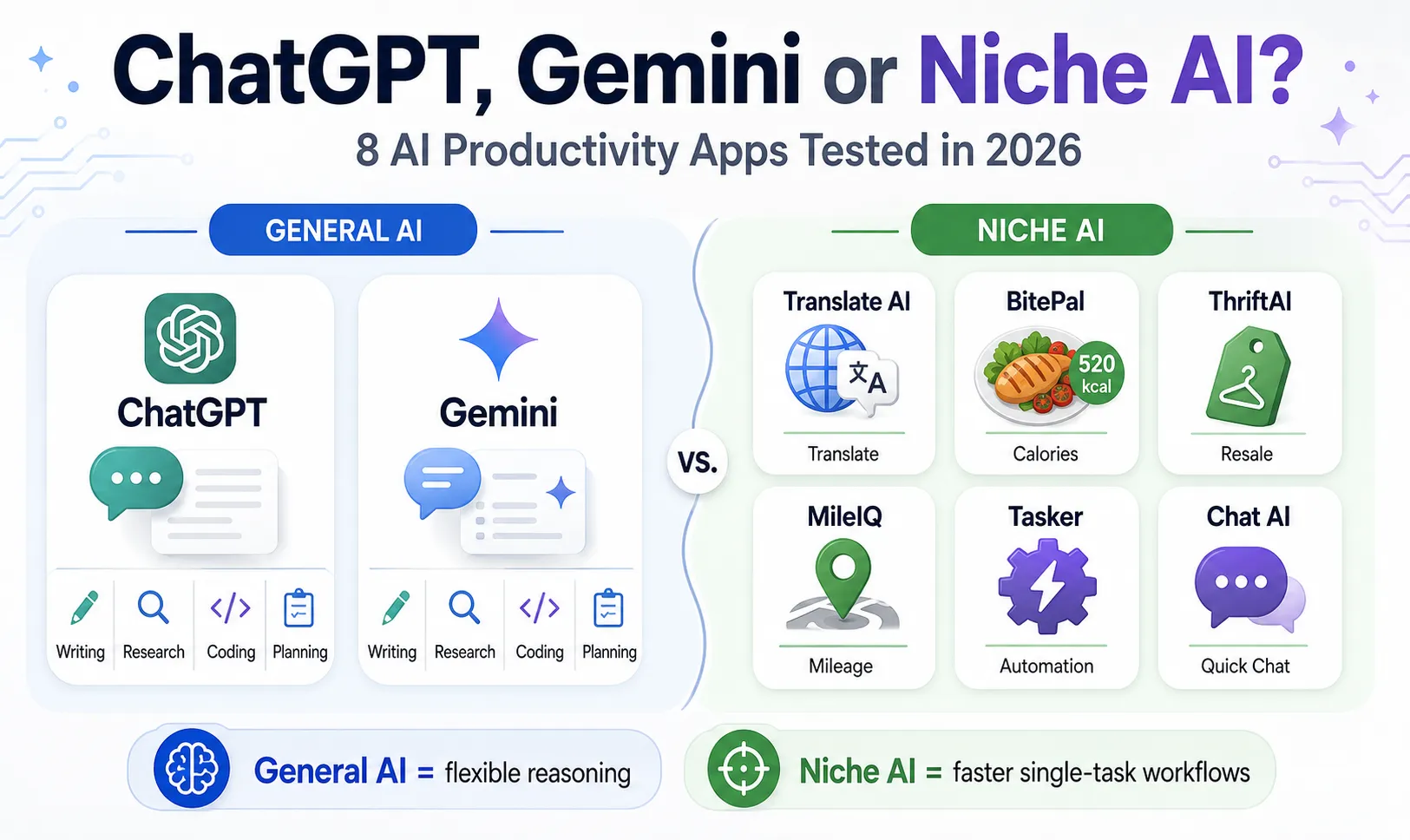
ChatGPT, Gemini, or a Niche AI App? We Tested 8 Productivity Tools in 2026
General-purpose AI assistants can now summarize documents, analyze images, write code, plan trips, and answer complex questions from a single chat window.
At the same time, thousands of smaller apps promise to complete one narrow task faster: translating a sign with a camera, identifying the resale value of a jacket, estimating calories from a meal photo, or automatically recording business mileage.
That creates a practical question:
Do you still need specialized apps, or can ChatGPT or Google Gemini replace most of them?
To find out, the ToolOnline editorial team tested eight popular AI-powered and automation tools in realistic mobile and desktop workflows. We compared not only answer quality, but also setup time, processing speed, number of manual steps, output usefulness, and the amount of correction required afterward.
Our conclusion was not that one type of tool always wins.
General AI assistants are better at reasoning and flexible tasks. Specialized apps are often better when the real problem is not intelligence, but friction: opening the camera, recognizing a specific type of object, saving the result in the correct format, and updating a log without extra work.
Quick Verdict
-
ChatGPT was the strongest general-purpose option for structured reasoning, document analysis, writing, and multi-step tasks.
-
Google Gemini was more convenient in workflows involving Google services and information already stored in a connected Google account.
-
Specialized AI apps were usually faster for camera-based tasks that needed an immediate, structured result.
-
Background utilities such as MileIQ were more useful than chatbots for tasks that should happen automatically without repeated prompts.
-
No single app replaced the entire workflow.
The 8 Apps We Tested
| App | Category | Main Test | Our Practical Score | Best For |
|---|---|---|---|---|
| ChatGPT | General AI assistant | Document analysis and multi-step reasoning | 9.5/10 | Research, writing, coding, structured problem-solving |
| Google Gemini | Workspace-focused AI assistant | Email and travel-information workflow | 9.2/10 | Users working heavily in Google services |
| Chat AI | Lightweight AI chat app | Fast everyday questions | 7.5/10 | Casual questions and simple text generation |
| Translate AI: Camera & Voice | Translation utility | Sign, menu, and spoken-language translation | 8.8/10 | Travelers and international shoppers |
| Tasker | Android automation | Trigger-based phone actions | 9.0/10 | Advanced Android users |
| ThriftAI | Resale visual assistant | Clothing-label and resale-price estimation | 8.2/10 | Resellers and thrift shoppers |
| BitePal | Food logging assistant | Meal-photo calorie and macro estimation | 8.0/10 | Users who want faster meal logging |
| MileIQ | Automatic mileage tracker | Passive trip detection and classification | 9.1/10 | Freelancers, drivers, and sales professionals |
These scores reflect our test scenarios rather than permanent rankings. App performance can change with model updates, account level, region, device, internet speed, and subscription plan.
How We Tested the Apps
We did not judge the apps only by reading feature pages or app-store descriptions.
Each tool was tested using a task that matched its main purpose. We recorded:
-
Time required to begin the task
-
Processing or response time
-
Number of taps or manual steps
-
Accuracy of the first result
-
Corrections required
-
Whether the result was saved in a useful format
-
Whether the app reduced work or merely moved it elsewhere
For AI-generated answers, we repeated important tasks more than once because the same prompt can produce different results.
For camera-based apps, we tested both clean and difficult inputs. These included poor lighting, angled photographs, mixed food plates, partially visible labels, and signs containing more than one language.
For automation apps, we focused on reliability over time rather than judging a single screen or response.
1. ChatGPT: Best Overall for Multi-Step Knowledge Work
ChatGPT performed best when a task required several types of reasoning in the same workflow.
Our Test
We uploaded a 20-page report and asked ChatGPT to:
-
Summarize the main findings
-
Separate confirmed facts from recommendations
-
Extract action items
-
Place the action items into a Markdown table
-
Rewrite the summary for a non-technical reader
This was designed to test whether the assistant could retain context while changing formats and audiences.
What Worked Well
The strongest part of the result was its structure.
ChatGPT correctly separated the report into themes, identified most of the actionable items, and maintained a consistent table format. When we asked it to rewrite the summary for a less technical audience, it simplified the language without completely removing the underlying meaning.
It was also easy to continue refining the output. We could request a shorter version, change the tone, add missing columns, or ask for a risk summary without starting again.
This flexibility is where general-purpose assistants have a major advantage over single-purpose apps.
What Required Review
The first response was not ready to publish without checking.
Some conclusions were phrased more confidently than the source document justified. A few related action items were merged together, which made the table cleaner but slightly changed their scope.
We therefore compared the summary with the original report before using it.
That review step matters. A well-written answer can still contain an incorrect interpretation, especially when the source material is ambiguous.
Friction in the Workflow
ChatGPT handled the analysis well, but moving information into another system still required manual work in our test setup.
For example, after generating the action table, we still had to copy it into our project-management or document tool and confirm the formatting.
Verdict
ChatGPT was the best choice for:
-
Long-document analysis
-
Structured writing
-
Coding and debugging
-
Comparing several options
-
Turning unstructured information into tables
-
Tasks that evolve through follow-up questions
It is less suitable for tasks that should happen automatically in the background without opening a chat.
2. Google Gemini: Best for Google-Centered Workflows
Gemini’s main advantage was not that every individual answer was better. Its advantage was reduced movement between tools when the task already involved Google services.
Our Test
We used a travel-planning workflow based on information from an airline confirmation email.
The task was to identify:
-
Flight date and time
-
Departure and arrival airport
-
Booking reference
-
Important travel notes
-
A simple itinerary that could be transferred into a document
What Worked Well
Gemini was convenient when the required information was already inside the Google ecosystem available to our test account.
It reduced the need to manually open an email, copy the flight information, switch to another application, and reformat it.
For users who spend most of the day in Gmail, Google Docs, Drive, Maps, and Android, this type of integration can save more time than a small difference in writing quality.
Where It Was Less Convincing
For open-ended creative work, our results sometimes felt more cautious and generic than ChatGPT’s.
When we requested several distinct campaign ideas, Gemini produced usable concepts, but they needed more follow-up prompting to become specific enough for production.
This does not mean Gemini is poor at creative work. It means its strongest advantage in our test was workflow context rather than unrestricted ideation.
Important Limitation
Connected-service features depend on region, account type, permissions, administrator settings, and the version of Gemini being used.
Users should also verify what data access they have enabled before relying on account integrations.
Verdict
Gemini is particularly useful for:
-
Google Workspace users
-
Email-based planning
-
Information already stored in Drive or Docs
-
Android-centered workflows
-
Tasks where avoiding copy-and-paste is more important than deep customization
3. Chat AI: Fast for Simple Questions, Limited for Complex Work
The lightweight Chat AI app started quickly and was easy to use for straightforward prompts.
Our Test
We asked it to:
-
Rewrite a short email
-
Explain a basic technical term
-
Generate five social captions
-
Compare two simple product options
-
Continue a longer conversation across several follow-up questions
What Worked Well
For short tasks, it was responsive and required very little setup.
The email rewrite and social captions were usable after minor editing. A user who mainly wants quick answers may not notice a large difference between this type of app and a more advanced assistant.
Where It Fell Behind
The limitations became clearer as the conversation grew.
It repeated earlier points, lost some instructions, and handled multi-step formatting less consistently than ChatGPT or Gemini.
The app was therefore more useful as a lightweight question box than as a central productivity system.
Verdict
Chat AI makes sense for:
-
Casual questions
-
Short rewrites
-
Simple brainstorming
-
Users who prioritize speed and a minimal interface
It is not our first choice for long documents, complex decisions, or workflows that depend on reliable context retention.
4. Translate AI: Camera & Voice — Better Than a General Chatbot for Fast Translation Capture
General AI assistants can translate text, but a specialized translation app can be faster when the source is directly in front of you.
Our Test
We tested three common travel situations:
-
A restaurant menu photographed at an angle
-
A shop sign containing small text
-
A short spoken conversation in a noisy environment
We compared the workflow with taking a photo, opening a general AI assistant, uploading the image, and explaining what should be translated.
What Worked Well
The specialized app reached the result faster.
Its camera interface was already designed for text recognition. It detected the relevant section of the image, extracted the words, and displayed the translation without requiring a detailed prompt.
For short signs and menu items, this reduced several manual steps.
The voice mode was also more convenient for quick exchanges because it was designed around continuous input and output rather than a normal chat conversation.
Accuracy Limitations
OCR accuracy dropped when the text was:
-
Curved
-
Reflective
-
Partially covered
-
Written in decorative fonts
-
Mixed with handwritten notes
Context also remained important. A literal translation may not explain whether a menu term refers to an ingredient, a cooking style, or a regional dish.
For legal, medical, immigration, or financial documents, machine translation should not be treated as a certified translation.
Verdict
Translate AI was more efficient than a general chatbot for immediate camera and voice translation.
A general AI assistant remained more helpful when we needed an explanation of tone, cultural meaning, or several possible translations.
5. ThriftAI: Useful for Rapid Resale Research
ThriftAI was designed for a narrow but practical job: identifying an item from a photo and estimating whether it may have resale value.
Our Test
We photographed the label and exterior of a vintage wool coat. We then compared two workflows:
Specialized workflow:
Open ThriftAI, photograph the item, and review the suggested brand and resale range.
General AI workflow:
Upload the same images to ChatGPT, ask it to identify the brand, estimate age and material, and suggest resale-search terms.
What Worked Well
ThriftAI was faster at moving from image to a resale-oriented result.
Instead of only identifying the brand, it organized the output around the information a reseller would care about:
-
Likely brand
-
Product category
-
Possible resale range
-
Relevant marketplace comparisons
-
Potential margin
That structure saved time in a thrift-store environment, where standing in an aisle and writing a detailed prompt is inconvenient.
Where It Could Be Wrong
The resale estimate should not be treated as a guaranteed selling price.
Actual value depends on:
-
Condition
-
Size
-
Fabric
-
Authenticity
-
Season
-
Regional demand
-
Shipping cost
-
Marketplace fees
-
Whether comparable listings actually sold
An app may also confuse active listing prices with completed sale prices. A seller asking $150 does not prove that buyers are paying $150.
Comparison With ChatGPT
ChatGPT provided a more detailed explanation of what to inspect, including stitching, country-of-origin labels, material tags, and signs of age.
ThriftAI was faster for a decision in the store. ChatGPT was better for deeper research after the item had already been purchased.
Verdict
ThriftAI is useful for resellers who want a fast first-pass estimate. It should be followed by manual marketplace research before buying an expensive item.
6. BitePal: Faster Meal Logging, but Nutrition Results Are Estimates
BitePal illustrates why specialized apps can remain valuable even when a general AI model can perform the same underlying analysis.
Our Test
We photographed a lunch plate containing:
-
Grilled chicken
-
Rice
-
Mixed vegetables
-
A visible sauce
We tested the same photograph in BitePal and a general AI chat assistant.
What Worked Well
BitePal produced a structured food log within a few seconds.
It divided the plate into likely components, estimated portion sizes, and placed the estimated calories and macronutrients into a daily log.
The biggest advantage was not necessarily superior food recognition. It was that the result was already inside a tracking workflow.
With a general chatbot, we received a similar nutritional explanation but still had to copy the numbers into another app or spreadsheet.
Where Accuracy Dropped
The app performed better with visually separate foods than with mixed dishes.
It was easier to estimate chicken, rice, and vegetables when each item occupied a clear section of the plate. It was less reliable with:
-
Stews
-
Curries
-
Soups
-
Hidden oils
-
Restaurant sauces
-
Mixed casseroles
-
Foods with ingredients underneath the visible layer
Portion size also remained a major source of error. A photograph cannot always reveal the weight, cooking method, or amount of oil used.
Health and Safety Limitation
Photo-based calorie estimates should be treated as rough logging aids, not clinical measurements.
People managing diabetes, eating disorders, allergies, kidney disease, pregnancy-related nutrition, or other medical conditions should not rely on an image estimate alone.
Verdict
BitePal reduced the friction of daily logging. Its value came from speed and organization rather than guaranteed nutritional precision.
7. Tasker: Powerful Automation, but Not Beginner-Friendly
Tasker is different from the other apps in this comparison.
It is not primarily a conversational AI assistant. It is an Android automation system that can connect triggers, conditions, phone settings, and actions.
Our Test
We created several basic workflows:
-
Enable a specific phone setting when arriving at a location
-
Change volume behavior during a scheduled period
-
Trigger an automated response under defined conditions
-
Launch an app after connecting to a selected device
What Worked Well
Tasker offered deeper control than normal consumer automation apps.
It could react to:
-
Time
-
Location
-
Device state
-
Connected hardware
-
Notifications
-
Application activity
-
Custom variables
Once configured correctly, the workflows ran without opening a chat window or issuing a new command.
That is the key distinction between automation and conversational AI. Chatbots respond when asked. Tasker can act when a defined condition occurs.
Learning Curve
The interface was not immediately intuitive.
Creating dependable automations required understanding profiles, tasks, triggers, conditions, permissions, and Android background restrictions.
A simple workflow could be created quickly, but debugging a more complex workflow took considerably longer.
Automated messages and settings changes also need safeguards. A poorly configured trigger can run at the wrong time or repeat unexpectedly.
Verdict
Tasker is one of the most capable options for advanced Android automation, but its power comes with setup cost.
It is best for users who enjoy building and testing workflows rather than expecting a one-tap AI solution.
8. MileIQ: Best Example of a Task That Should Not Be a Chat
Mileage tracking is a strong example of why a specialized background utility can be more useful than a sophisticated AI assistant.
Our Test
We enabled automatic trip detection and used the app during normal driving activity.
We evaluated:
-
Whether trips were detected
-
Whether start and end points were plausible
-
How easy it was to classify personal and business drives
-
Whether the log could be reviewed later
-
How much ongoing user input was required
What Worked Well
After setup, the app required little active attention.
It recorded trips in the background and presented them later for classification. This was far more practical than asking a chatbot to record every journey manually.
The value came from passive data collection, not complex reasoning.
Where Review Was Still Necessary
Automatic detection was not a reason to ignore the log.
Short stops, public transport, rides as a passenger, GPS drift, and overlapping routes can create records that need correction.
Users claiming business expenses should review classifications and retain documentation required by their local tax rules.
Battery use and background permissions may also vary by phone.
Verdict
MileIQ was one of the clearest examples of a specialized app solving a workflow better than a chatbot.
The task needs continuous detection and logging. A conversation interface is simply the wrong shape for that job.
General AI vs. Specialized AI: What Actually Matters?
The comparison is often framed as a contest between “smarter” and “less intelligent” software.
In practice, the more useful question is:
How many steps separate the user from the completed task?
ChatGPT may be capable of identifying food, translating a sign, estimating resale value, and recording travel details. But capability does not automatically equal convenience.
A specialized app may win because it already includes:
-
A camera interface
-
A structured database
-
Automatic timestamps
-
Background tracking
-
Saved history
-
Category-specific fields
-
Export options
-
Reminders
-
A workflow designed around one repeated action
General AI wins when the task is unpredictable. Specialized software wins when the same structured task happens repeatedly.
Recommended 2026 Productivity Stack
Rather than forcing one app to do everything, we recommend building a three-layer setup.
Layer 1: The Core Reasoning Assistant
Choose ChatGPT or Gemini for:
-
Writing
-
Research
-
Document analysis
-
Coding
-
Decision support
-
Brainstorming
-
Complex planning
Choose ChatGPT when flexible reasoning and iterative output matter most.
Choose Gemini when the task is closely tied to Google services available in your account.
Layer 2: High-Friction Specialized Tasks
Use a vertical tool when the task begins with a camera, microphone, or specialized data entry.
Examples include:
-
Translate AI for instant signs and speech
-
ThriftAI for rapid resale screening
-
BitePal for meal logging
The advantage is usually workflow speed, not a more intelligent underlying explanation.
Layer 3: Passive Background Utilities
Use dedicated automation tools for tasks that should happen without a prompt.
Examples include:
-
MileIQ for trip detection
-
Tasker for Android triggers and device actions
A chatbot is not a good replacement for software that needs to observe events continuously.
Which App Should You Choose?
Choose ChatGPT when:
-
The task involves several steps
-
You need explanations and revisions
-
You work with long documents
-
The input changes from day to day
-
You need writing, coding, analysis, and planning in one place
Choose Gemini when:
-
Most of your work is already in Google services
-
Connected context saves significant time
-
You use Android and Google Workspace heavily
-
Email, files, and travel information are central to the workflow
Choose a specialized AI app when:
-
You repeat the same task frequently
-
The task starts with a camera or microphone
-
The output needs to be saved into a dedicated log
-
Opening a chat and writing prompts creates unnecessary friction
Choose an automation utility when:
-
The task should run in the background
-
A trigger can be clearly defined
-
Continuous logging matters more than conversational reasoning
Test Limitations
Our results should not be interpreted as universal performance guarantees.
Response quality and processing speed can change based on:
-
App version
-
AI model version
-
Subscription plan
-
Server demand
-
Device
-
Operating system
-
Region
-
Internet connection
-
Connected-account permissions
-
Input quality
Image-based estimates are particularly sensitive to lighting, angle, resolution, and missing context.
We also did not treat an app’s first answer as automatically correct. Important outputs were compared with the original document, visible label, route history, or known reference information whenever possible.
No AI-generated result should replace professional advice in medical, legal, tax, or financial decisions.
Final Verdict
ChatGPT and Gemini can replace many isolated AI features, but they cannot replace every specialized workflow.
ChatGPT was the strongest overall reasoning and content tool in our tests.
Gemini was particularly convenient when the information already existed inside a Google-centered workflow.
Translate AI, ThriftAI, and BitePal demonstrated that vertical tools can still be valuable because they reduce taps, prompts, and manual data entry.
Tasker and MileIQ showed an even more important distinction: some productivity tasks should not begin with a conversation at all. They should happen automatically.
The best 2026 productivity setup is therefore not one AI app. It is a small, deliberate stack:
-
One general assistant for thinking
-
A few specialized tools for repeated high-friction tasks
-
Background automation for work that should happen without asking
That approach produced a faster and more dependable workflow than trying to make a single chatbot handle everything.
Frequently Asked Questions
Can ChatGPT replace specialized AI apps?
It can reproduce many individual functions, including translation, food recognition, item identification, and text generation. However, it may not replace the specialized interface, saved history, automatic tracking, or background behavior of a dedicated app.
Is ChatGPT better than Google Gemini?
Neither is better for every user. ChatGPT performed better in our multi-step reasoning and document workflow. Gemini was more convenient for tasks involving Google services available in the test account.
Are niche AI apps more accurate?
Not automatically. Their advantage is often workflow design rather than raw model intelligence. A specialized app may produce a faster structured result while still requiring verification.
Can AI accurately count calories from a photo?
It can estimate visible foods and likely portions, but it cannot reliably know exact weight, hidden ingredients, cooking oil, or recipe details from one image. Results should be treated as estimates.
Is MileIQ an AI app?
It is more accurately described as an automatic mileage-tracking utility. It belongs in this comparison because it competes with AI assistants for a productivity task, even though its main value is passive tracking rather than generative AI.
Is Tasker suitable for beginners?
Basic automations are possible for beginners, but advanced workflows require time to learn, test, and troubleshoot.