










Jordan Blake


I use the camera mode to ask what a plant or appliance part is, then follow up without taking another photo. It usually gets me close, although I still verify anything that could cost money.

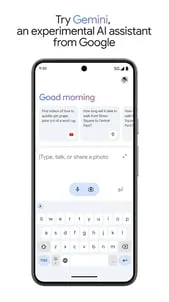
Google’s Android AI assistant for writing, planning, creating, learning, and live multimodal help.
Google ecosystem users who want the company’s AI on Android.
Gemini Live
Freemium
No ads
Gemini works online and signs in with a Google account.
4.6/5
Google’s Android AI assistant for writing, planning, creating, learning, and live multimodal help.
The Play listing frames Gemini as a personal, proactive assistant that can move from quick drafting to deeper research and creative work.
It leans heavily on Gemini Live, Google app connections, and uploads from documents, spreadsheets, photos, and videos, so the app is built for real tasks rather than single-turn chat.
The free app is only part of the picture: Google also advertises Google AI Plus, Pro, Ultra, and Workspace plans, so the Android app and the paid tiers should be treated separately.
 Core features
 Gemini Live: Supports real-time brainstorming and can use your screen or camera as shared context.Google app connections: Can connect to Gmail, Calendar, Google Photos, YouTube, and Search for more personalized help.File and media uploads: Accepts documents, spreadsheets, photos, videos, and more for summaries and insights.Creative generation: The listing highlights image editing, mockups, diagrams, and prompt-to-prototype workflows.
 Pros and cons
 Pros
Pros Cons
ConsYes. The app is free to install, and Google also advertises paid plans.
Yes. The listing mentions Gmail, Calendar, Google Photos, YouTube, and Search.
Yes. Gemini Live can use your screen or camera in a live session.
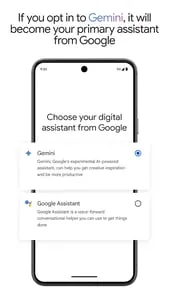
If you opt in to Gemini on the phone, the listing says it becomes the primary assistant.



| App | Rating | Core feature | Pricing | Supported platforms |
|---|---|---|---|---|
| Google Gemini | ★ 4.6 | Gemini Live | Freemium | Android |
| Chat AI - AI Chatbot Assistant | ★ 4.5 | Natural chat | Freemium | Android |
| Translate: AI, Camera & Voice | ★ 4.7 | Camera translation | Freemium | Android |
The most complete mainstream AI assistant in this set for Android users already inside Google services.
Strong choice if you want broad assistant features and are comfortable sorting free features from plan-gated ones.
Toolonline Editorial · 2026-07-23
How people use Google Gemini in everyday life
6 reviews
I use the camera mode to ask what a plant or appliance part is, then follow up without taking another photo. It usually gets me close, although I still verify anything that could cost money.
Gemini feels most useful when I let it work with my Google routine. I can ask about a calendar plan, summarize something from a file, or brainstorm while keeping the conversation moving. I did spend some time checking the account connections, because personal data access is not something I want to enable casually.
Gemini Live makes the app feel different from a normal chat box. I like talking through a rough idea, showing the camera for context, then turning the notes into a cleaner draft. The free app is already useful for planning and learning, though heavier creative work clearly pushes you toward paid AI tiers.
Connecting Gemini to Gmail was useful for finding travel details, but making it my default assistant changed a few phone habits I already liked. I kept the app and turned on only the integrations I actually use.
Good app for summarizing a long email.
Gemini Live is nice when I don't feel like typing.
 Write a review