









Video Compressor

Video Compressor

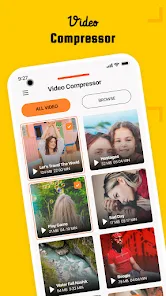
Video Compressor is a straightforward Android utility for shrinking video files in batches with custom resolution and bitrate controls.

Android Version: 1.10.0 Size: 60MB Last updated: 2026-06-18

Who this app is for

People who need to shrink short videos before sharing them.

Core feature

Batch compression

Pricing

Free

Ads

Contains ads

Video access

Batch jobs read source clips and write compressed copies to storage.

Google Play rating

3.3/5

App introduction

Video Compressor is a straightforward Android utility for shrinking video files in batches with custom resolution and bitrate controls.

The app is built around one job: compressing videos quickly so they take up less space and are easier to share.

You can process multiple clips at once, compare original and compressed sizes, and choose either preset or custom output settings instead of relying on a single one-size-fits-all profile.

Core featuresCore features

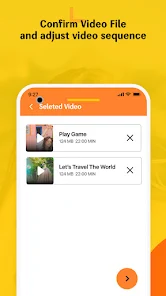
  • Batch compressionBatch compression: Select several videos at once and compress them in one pass instead of repeating the same steps file by file.
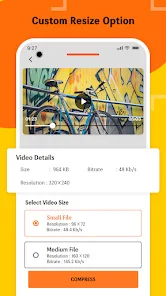
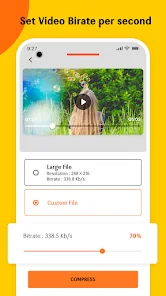
  • Custom output settingsCustom output settings: Tune resolution and bitrate manually when you want smaller files or a better quality-to-size balance.
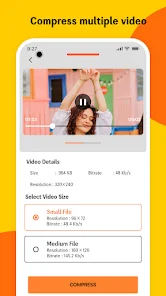
  • Preset size optionsPreset size options: Use the built-in small, medium, and large presets when you do not want to configure every detail yourself.
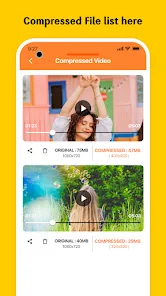
  • Before-and-after size checksBefore-and-after size checks: The app shows original and compressed file size, resolution, and bitrate so you can verify the tradeoff.

Pros and consPros and cons

ProsPros

  • Batch compression saves time when you have several clips to shrink.
  • Custom bitrate and resolution controls give you more control than a single auto preset.
  • The size comparison view makes it easier to judge whether the compression result is worth keeping.

ConsCons

  • It is focused on compression rather than full video editing.
  • Ads are part of the free version.
  • There is no indication of advanced workflow features such as trimming, filters, or multi-track editing.

Who this app is for

  • People who need to shrink short videos before sharing them.
  • Users trying to free up storage on an Android phone.
  • Anyone who prefers a simple compression tool over a full editor.

Before you download

  • Use it when your main goal is smaller video files, not creative editing.
  • Check available storage before starting large batch jobs so the app has room for both source and output files.
  • Expect an ad-supported free experience while using the compression workflow.

Frequently asked questions

Can Video Compressor handle more than one file at a time?

Yes. The Play listing says it can compress multiple videos in a batch.

Can I control quality and file size?

Yes. The listing highlights custom resolution and bitrate controls alongside preset options.

Does it show how much space I save?

Yes. The app shows size, resolution, and bitrate for both the original and compressed videos.

Is it a full video editor?

No. Its documented focus is video compression rather than trimming, effects, or timeline editing.

Screenshots

Video Compressor screenshot 1Video Compressor screenshot 2Video Compressor screenshot 3Video Compressor screenshot 4Video Compressor screenshot 5Video Compressor screenshot 6Video Compressor screenshot 7Video Compressor screenshot 8Video Compressor screenshot 9Video Compressor screenshot 10

Similar app comparison

AppRatingCore featurePricingSupported platforms
Video Compressor★ 3.3Batch compressionFreeAndroid
AI Video - AI Video Generator★ 4.5Text-to-video generationFreemiumAndroid
PixVerse: AI Video Generator★ 4.5Multiple input typesFreemiumAndroid
6.3/ 10

App review

Video Compressor is a lightweight, ad-supported Android utility with a 3.2/5 Play rating that focuses on fast batch shrinking rather than editing.

Choose it if you want a simple way to reduce video size and can live with ads; skip it if you need a broader editor or advanced export controls.

Toolonline Editorial · 2026-07-23

Batch compression6.6/10
Custom output settings6.3/10
Preset size options6.1/10
Before-and-after size checks6.4/10

You May Also Like

Related Apps

User reviews

How people use Video Compressor in everyday life

3.3
3.3 out of 53.3 out of 53.3 out of 53.3 out of 53.3 out of 5

4 reviews

Caleb Singh

3.5 out of 53.5 out of 53.5 out of 53.5 out of 53.5 out of 5

I keep it around for cleaning up storage after recording a bunch of short clips. Being able to lower the resolution manually gives me more control than a one-button compressor. Just remember to leave room for the output files before starting a batch.

Maya Rivera

4.0 out of 54.0 out of 54.0 out of 54.0 out of 54.0 out of 5

I use this when family videos are too large to send from my Android phone. Picking several clips at once saves a lot of tapping, and I like seeing the file size before and after instead of guessing. It is not a real editor, though, so I still open another app if I need trimming or filters.

Jonas Martinez

3.0 out of 53.0 out of 53.0 out of 53.0 out of 53.0 out of 5

The presets are simple enough for me, especially small and medium when I just need a smaller copy. Custom bitrate is helpful, but the free experience feels interrupted by ads. Good for compressing, not something I would use for a more careful video project.

Elena Taylor

2.5 out of 52.5 out of 52.5 out of 52.5 out of 52.5 out of 5

Simple app, useful when a video is too large to share.

Write a review Write a review
Your rating
back to top