










Translate: AI, Camera & Voice

Translate: AI, Camera & Voice

A translation app that combines text, camera, voice, keyboard, and offline use for quick language help.

Android Version: 2.1.5 Size: 35 MB Last updated: 2025-01-01

Who this app is for

Travelers who need quick translation on the move.

Core feature

Camera translation

Pricing

Freemium

Ads

Contains ads

Input access

Camera and microphone access are used for photo and voice translation.

Google Play rating

4.8/5

App introduction

A translation app that combines text, camera, voice, keyboard, and offline use for quick language help.

The Play page describes Translate: AI, Camera & Voice as a friendly AI translator that can handle text, spoken words, and photos in more than 150 languages.

It is set up to work as a daily language helper: point the camera at signs, speak a phrase, translate photos from your gallery, or use the keyboard inside other apps.

The app also advertises offline packs and favorites, which makes it feel aimed at travel and everyday communication instead of one-off translation only.

Core featuresCore features

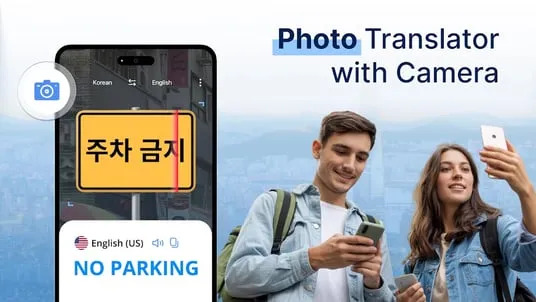
  • Camera translationCamera translation: Point the camera at signs, menus, or documents and get on-screen translation.
  • Voice translationVoice translation: Supports real-time two-way spoken conversations with voice input and output.
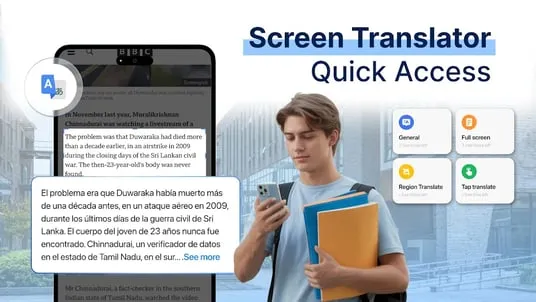
  • Translator keyboardTranslator keyboard: Lets you translate messages inside other apps instead of switching back and forth.
  • Offline language packsOffline language packs: Promises reliable translation even without Wi-Fi if you download the packs first.

Pros and consPros and cons

ProsPros

  • Multiple input modes make it useful in more than one situation.
  • Offline packs help if you travel or lose signal.
  • The app is easy to test without paying up front.

ConsCons

  • Ads and optional purchases shape the free experience.
  • Camera and voice translation quality can vary with lighting, accents, and language pair.
  • The app can be overkill if you only need a plain text translator.

Who this app is for

  • Travelers who need quick translation on the move.
  • Students working across different languages.
  • People messaging across languages inside chat apps.

Before you download

  • Check the exact language pair you need before relying on it.
  • Test camera translation in good light to see how OCR handles your use case.
  • Download offline packs before flights or trips with weak connectivity.

Frequently asked questions

Can it translate photos?

Yes. The listing says it can translate text from saved photos and live camera shots.

Does it work offline?

Yes, the listing says you can download language packs for offline use.

Can I translate inside other apps?

Yes. The translator keyboard is designed for messages inside other apps.

Is it free?

Yes, but the Play listing shows ads and optional in-app purchases.

Screenshots

Translate: AI, Camera & Voice screenshot 1Translate: AI, Camera & Voice screenshot 2Translate: AI, Camera & Voice screenshot 3Translate: AI, Camera & Voice screenshot 4Translate: AI, Camera & Voice screenshot 5

Similar app comparison

AppRatingCore featurePricingSupported platforms
Translate: AI, Camera & Voice★ 4.8Camera translationFreemiumAndroid
Chat AI - AI Chatbot Assistant★ 4.5Natural chatFreemiumAndroid
Google Gemini★ 4.6Gemini LiveFree; optional Google AI planAndroid
9.3/ 10

App review

A practical all-in-one translator when you need more than plain text translation.

Useful for travel and multilingual chat, but check the exact languages and offline packs before you rely on it.

Toolonline Editorial · 2026-07-23

Camera translation9.6/10
Voice translation9.3/10
Translator keyboard9.1/10
Offline language packs9.4/10

You May Also Like

Related Apps

User reviews

How people use Translate: AI, Camera & Voice in everyday life

4.0
4.0 out of 54.0 out of 54.0 out of 54.0 out of 54.0 out of 5

7 reviews

Kenji Adams

5.0 out of 55.0 out of 55.0 out of 55.0 out of 55.0 out of 5

Downloading offline packs before traveling made this much more practical. I used text, camera, and voice modes for different situations instead of relying on one tool for everything. The 150+ language coverage is reassuring, but I still test my language pair before depending on it.

Laura Gomez

4.0 out of 54.0 out of 54.0 out of 54.0 out of 54.0 out of 5

I downloaded the Spanish-to-Portuguese pack before a weekend in Lisbon. Typed phrases and clear menu photos worked well enough that I did not have to depend on hotel Wi-Fi.

Hannah Rivera

4.5 out of 54.5 out of 54.5 out of 54.5 out of 54.5 out of 5

Camera translation is handy for menus, labels, and signs when I do not want to type everything by hand. Good lighting matters, but when the text is clear the app gets me close enough to understand. I also like saving phrases I know I will need again.

Thomas Nguyen

3.0 out of 53.0 out of 53.0 out of 53.0 out of 53.0 out of 5

Printed text translates better than handwriting on my phone. The camera missed a few stylized signs, but typing the same words gave a useful result.

Diego Martinez

4.0 out of 54.0 out of 54.0 out of 54.0 out of 54.0 out of 5

The translator keyboard is more useful than I expected. I can reply in a messaging app without copying text back and forth, which makes short conversations less awkward. I still check important wording, especially for formal messages, because automatic translation can sound a little stiff.

Molly Singh

3.0 out of 53.0 out of 53.0 out of 53.0 out of 53.0 out of 5

Camera translation is nice for menus and signs.

Amelia Ross

4.5 out of 54.5 out of 54.5 out of 54.5 out of 54.5 out of 5

Good for travel, just download languages before leaving Wi-Fi.

Write a review Write a review
Your rating
back to top