Tasker

Tasker

A deep Android automation engine for people who want rules, triggers, and custom actions on the device.

Android Version: 6.2.22 Size: 49 MB Last updated: 2025-01-01

Who this app is for

Android power users who like to automate repeat tasks.

Core feature

Context-based automations

Pricing

Paid

Ads

No ads

On-device automation

Each automation needs permission for the Android setting or action it controls.

Google Play rating

4.3/5

App introduction

A deep Android automation engine for people who want rules, triggers, and custom actions on the device.

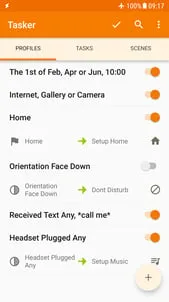
Tasker’s official site describes it as automation based on contexts such as app, time, date, location, event, and gesture, which makes it a rule engine instead of a single-purpose utility.

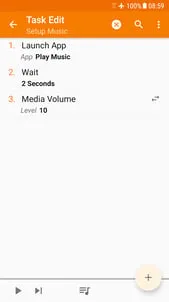
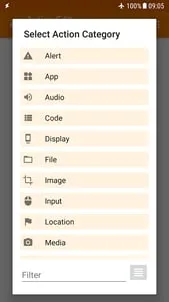
The Play listing highlights 130+ states and events, 350+ actions, widgets, scenes, file backups, and more. That scope is what makes Tasker powerful—and also what makes it a project rather than a casual app.

Tasker costs $4.49 on Google Play, while the developer also offers a direct seven-day trial for people who want to test an automation before buying.

Core featuresCore features

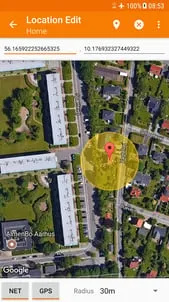
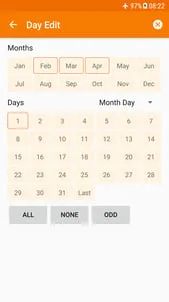
  • Context-based automationsContext-based automations: Builds automations from app, time, location, Wi-Fi, SMS, call, and many other states and events.
  • 350+ actions350+ actions: Can send SMS, change system settings, control Do Not Disturb, manipulate files, and more.
  • Triggers and shortcutsTriggers and shortcuts: Supports widgets, quick settings tiles, volume buttons, notifications, and other launch points.
  • Scenes and app creationScenes and app creation: Lets you design custom UI scenes and package standalone apps with Tasker App Factory.

Pros and consPros and cons

ProsPros

  • Huge automation depth for Android power users.
  • Most of the app does not require root.
  • Mature documentation, examples, and community support lower the learning barrier.

ConsCons

  • The learning curve is steep if you have never built automations before.
  • Some actions still require root or special permissions.
  • It is a paid purchase, so casual users need a real use case to justify it.

Who this app is for

  • Android power users who like to automate repeat tasks.
  • People building custom device behaviors or workflows.
  • Users willing to spend time learning a flexible automation system.

Before you download

  • Start with the trial or official examples before paying if you are uncertain.
  • Expect setup time; Tasker rewards planning more than casual tapping.
  • Check permissions and root requirements only for the actions you actually want.

Frequently asked questions

Does Tasker need root?

No for most functions, but a few actions do require root.

Is there a trial?

Yes. The official site says there is a direct-download 7-day trial.

What can Tasker automate?

It can automate app behavior, settings, messages, file actions, triggers, and much more.

Is Tasker beginner-friendly?

Not really at first, but the examples and community help a lot.

Screenshots

Tasker screenshot 1Tasker screenshot 2Tasker screenshot 3Tasker screenshot 4Tasker screenshot 5

Similar app comparison

AppRatingCore featurePricingSupported platforms
Tasker★ 4.3Context-based automationsPaidAndroid
Chat AI - AI Chatbot Assistant★ 4.5Natural chatFreemiumAndroid
Google Gemini★ 4.6Gemini LiveFree; optional Google AI planAndroid
8/ 10

App review

The deepest automation tool here, but it expects you to invest time.

Buy it only if you want real Android automation; casual users are likely better off with simpler tools.

Toolonline Editorial · 2026-07-23

Context-based automations8.2/10
350+ actions7.9/10
Triggers and shortcuts7.7/10
Scenes and app creation8/10

You May Also Like

Related Apps

User reviews

How people use Tasker in everyday life

4.1
4.1 out of 54.1 out of 54.1 out of 54.1 out of 54.1 out of 5

4 reviews

Grace Foster

4.0 out of 54.0 out of 54.0 out of 54.0 out of 54.0 out of 5

Scenes and custom controls are what made Tasker click for me. I made a small interface for actions I repeat often instead of hunting through Android settings. It does feel more like a hobby project than a casual utility, so I only recommend it to people who enjoy tinkering.

Victor Nguyen

4.5 out of 54.5 out of 54.5 out of 54.5 out of 54.5 out of 5

Tasker is not a tap-once-and-forget app, but that is why I like it. I set up profiles around Wi-Fi, time, and app state, then tied them to actions like changing notification settings. The permission setup takes patience, and the results feel very personal once the logic is right.

Rachel Diaz

3.0 out of 53.0 out of 53.0 out of 53.0 out of 53.0 out of 5

I can see why power users love it, but the learning curve hit me fast. There are so many contexts, triggers, and actions that I had to slow down and use examples. If you want a simple automation checklist, this may feel like building the checklist yourself.

Leo Patel

5.0 out of 55.0 out of 55.0 out of 55.0 out of 55.0 out of 5

Brilliant once it is set up, but definitely not beginner-friendly.

Write a review Write a review
Your rating
back to top