









Waze Navigation & Live Traffic

Waze Navigation & Live Traffic

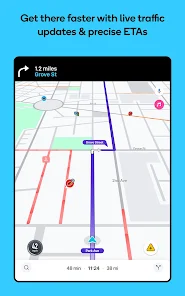
Waze is a live navigation app that uses crowd-sourced road reports to reroute drivers around traffic, hazards, and delays.

Android Version: 1.2.0 Size: 25MB Last updated: 2026-06-18

Who this app is for

Commuters who want faster routes and incident alerts.

Core feature

Live rerouting

Pricing

Free

Ads

Contains ads

Live location

Navigation needs location access and live road data while driving.

Google Play rating

4.2/5

App introduction

Waze is a live navigation app that uses crowd-sourced road reports to reroute drivers around traffic, hazards, and delays.

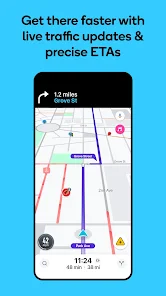
The app focuses on real-time navigation: it combines live traffic, automatic rerouting, incident reports, and ETA updates so drivers can adjust on the fly.

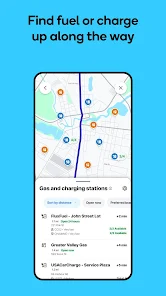
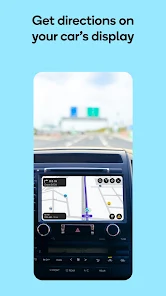
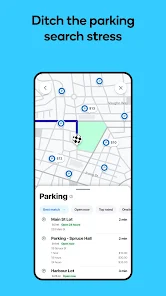
It also goes beyond turn-by-turn directions with safety alerts, toll awareness, fuel and EV station lookup, parking comparisons, and Android Auto integration.

Core featuresCore features

  • Live reroutingLive rerouting: Waze recalculates routes around traffic, incidents, and road closures to help you avoid delays.
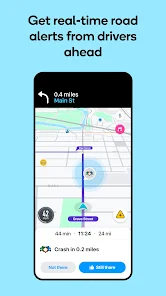
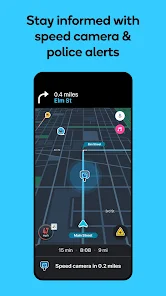
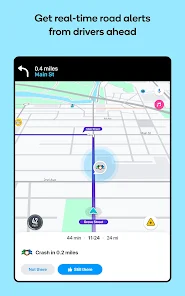
  • Safety and hazard alertsSafety and hazard alerts: The app surfaces roadworks, crashes, police, potholes, speed bumps, weather hazards, and similar warnings.
  • Trip planning extrasTrip planning extras: You can check toll pricing, fuel or EV stations, parking options, and future ETAs before you set out.
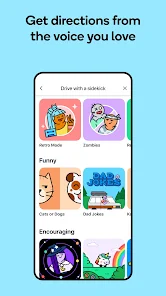
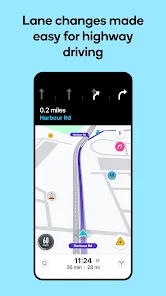
  • Hands-free driving supportHands-free driving support: Voice guidance, multi-lane help, and Android Auto make it easier to follow directions while driving.

Pros and consPros and cons

ProsPros

  • Real-time traffic rerouting is the core strength of the app.
  • The safety alert set is unusually broad for a mobile navigation app.
  • Android Auto support and voice guidance make it practical for daily commuting.

ConsCons

  • Some features are not available in all countries.
  • The app is not intended for emergency or oversized vehicles.
  • Its usefulness depends on live traffic data and location sharing while driving.

Who this app is for

  • Commuters who want faster routes and incident alerts.
  • Drivers who regularly deal with road closures, tolls, or parking decisions.
  • Road-trippers who want live ETA and hazard updates on the go.

Before you download

  • Expect to grant location access if you want live navigation to work properly.
  • Check whether the road-reporting and voice features you need are available in your country.
  • Use Waze for passenger-vehicle navigation, not for emergency or oversized vehicle routing.

Frequently asked questions

What makes Waze different from a basic map app?

Its real-time crowd reports and rerouting logic are the standout features.

Can Waze warn me about hazards on the road?

Yes. The listing calls out alerts for crashes, roadworks, police, potholes, and more.

Does Waze work with Android Auto?

Yes. The Play page explicitly mentions Android Auto support.

Are all features available everywhere?

No. The store description says some features are not available in all countries.

Screenshots

Waze Navigation & Live Traffic screenshot 1Waze Navigation & Live Traffic screenshot 2Waze Navigation & Live Traffic screenshot 3Waze Navigation & Live Traffic screenshot 4Waze Navigation & Live Traffic screenshot 5Waze Navigation & Live Traffic screenshot 6Waze Navigation & Live Traffic screenshot 7Waze Navigation & Live Traffic screenshot 8Waze Navigation & Live Traffic screenshot 9Waze Navigation & Live Traffic screenshot 10

Similar app comparison

AppRatingCore featurePricingSupported platforms
Waze Navigation & Live Traffic★ 4.2Live reroutingFreeAndroid
Fly Delta★ 4.8Booking and trip planningFree app; flights sold separatelyAndroid
United Airlines★ 4.7Search and book flightsFree app; flights sold separatelyAndroid
8.6/ 10

App review

Waze is a highly rated live-navigation app with a 4.3/5 Play score and a strong focus on crowd-sourced route corrections and driving alerts.

Choose Waze if live traffic and hazard reporting matter more than offline simplicity; skip it if you need a static, low-data navigation tool.

Toolonline Editorial · 2026-07-23

Live rerouting8.8/10
Safety and hazard alerts8.5/10
Trip planning extras8.3/10
Hands-free driving support8.6/10

You May Also Like

Related Apps

User reviews

How people use Waze Navigation & Live Traffic in everyday life

4.2
4.2 out of 54.2 out of 54.2 out of 54.2 out of 54.2 out of 5

5 reviews

Hannah Vasquez

3.5 out of 53.5 out of 53.5 out of 53.5 out of 53.5 out of 5

Android Auto support makes it easier to follow directions without fiddling with the phone. The alerts can be really helpful, but the app depends heavily on live data and other drivers reporting what they see. In quiet areas it feels less special.

Kim Alvarez

4.5 out of 54.5 out of 54.5 out of 54.5 out of 54.5 out of 5

A driver report warned me about a school-road closure before the official signs were visible. The alternate route added only a few minutes and saved a long turnaround.

Luis Carter

4.5 out of 54.5 out of 54.5 out of 54.5 out of 54.5 out of 5

I like checking future ETAs before deciding when to leave. Lane guidance and voice directions are practical, and the fuel station lookup is handy on road trips. Some features vary by region, but for daily commuting it has been my preferred traffic view.

Tessa Garcia

4.5 out of 54.5 out of 54.5 out of 54.5 out of 54.5 out of 5

Waze is the navigation app I open before weekday drives because the hazard reports are more specific than a plain map. Potholes, crashes, and roadwork warnings help me stay alert. I keep location access on only when I am actually driving.

Marcus Bennett

4.0 out of 54.0 out of 54.0 out of 54.0 out of 54.0 out of 5

Still the best app I have used for live traffic warnings.

Write a review Write a review
Your rating
back to top