Perplexity vs ChatGPT Search vs Google AI Mode in 2026: Which AI Search Engine Should You Use?
Search is no longer just a list of blue links.
When people want to compare products, understand a complicated technical topic, research a breaking story, plan a trip, or troubleshoot an error, they increasingly expect something different from a search engine:
an answer first, with sources available when they want to verify it.
That shift has created a new category of AI-powered search tools.
Three of the most important options in 2026 are Perplexity, ChatGPT Search, and Google AI Mode.
At first glance, all three appear to do roughly the same thing:
You ask a natural-language question, the system searches for relevant information, and an AI model creates a synthesized response.
In practice, however, they feel quite different.
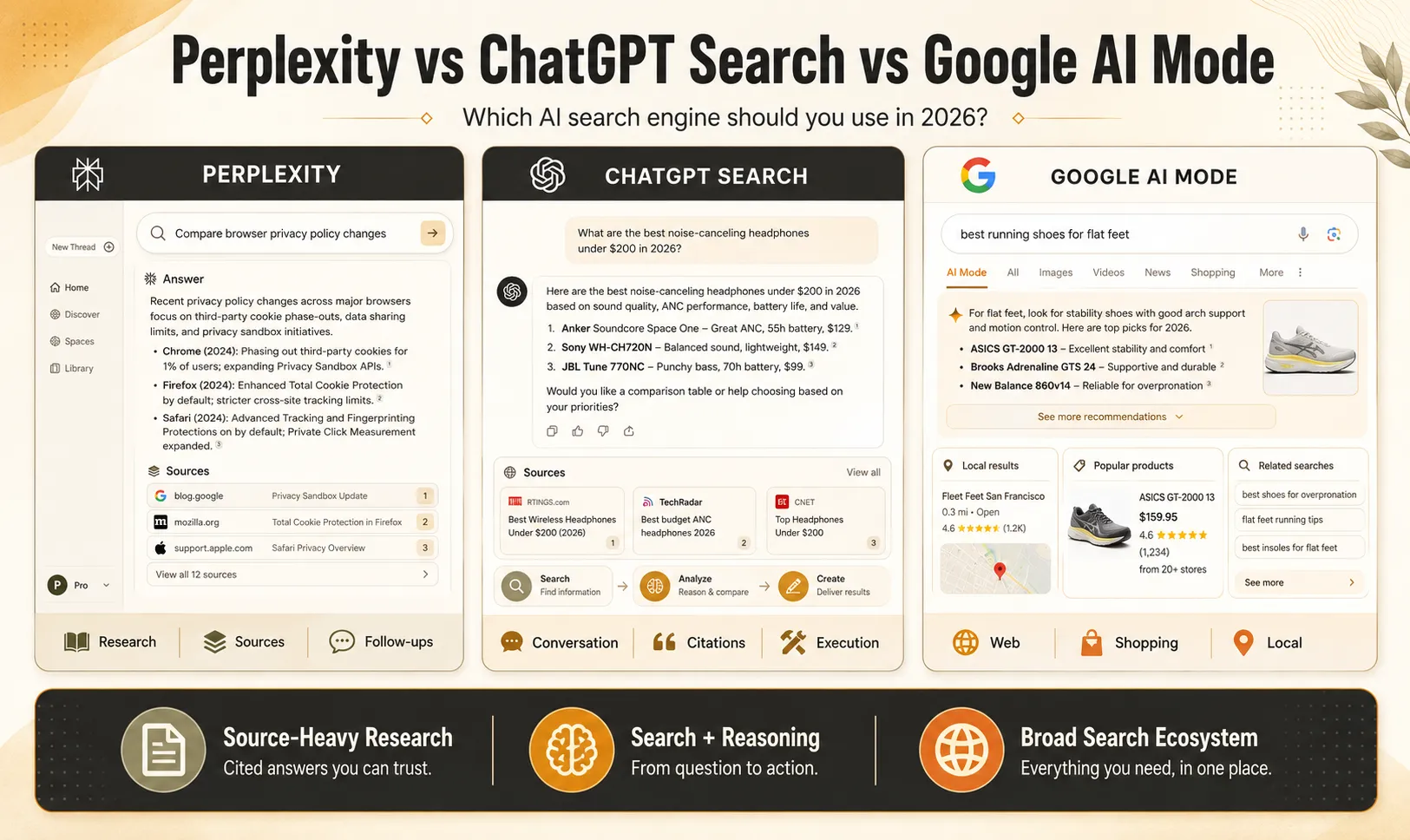
Perplexity is built around source-heavy research and an answer-engine interface.
ChatGPT Search combines web search with a broader conversational assistant that can continue working with the information after it has been found.
Google AI Mode builds conversational AI directly on top of Google's enormous Search ecosystem, including web results, shopping, local information and other structured data.
So there is no useful answer to the question:
“Which AI search engine is universally the best?”
A better question is:
Which one is best suited to the type of search you are doing?
This guide compares the three based on research, source verification, shopping, local search, technical questions, follow-up reasoning and everyday use.
Quick Comparison: Perplexity vs ChatGPT Search vs Google AI Mode
| Category | Perplexity | ChatGPT Search | Google AI Mode |
|---|---|---|---|
| Core approach | Search-first answer engine | Conversational AI + web search | Google Search + conversational AI |
| Web citations | Strong focus | Yes, with inline citations and Sources panel | Yes, with supporting links |
| Follow-up questions | Excellent | Excellent | Excellent |
| Multiple AI models | Available on paid plans | Uses ChatGPT's available models | Google Gemini models |
| Deep research | Yes | Yes, separate Deep Research workflow | Advanced multi-query AI search |
| Coding & technical explanation | Strong | Particularly useful | Strong |
| Shopping discovery | Good | Integrated shopping capabilities | Deep integration with Google Shopping |
| Local search | Useful | Supports location-aware results | Deep integration with Google Search ecosystem |
| Research workflow | Excellent | Excellent | Excellent |
| Best fit | Source-heavy research | Search + reasoning + execution | Broad web, shopping and local discovery |
The important difference is not simply answer quality.
It is what happens before and after the answer appears.
What Changed in AI Search by 2026?
AI search is developing too quickly for older comparisons to remain accurate for long.
Google AI Mode, for example, has moved far beyond the experimental product introduced in 2025.
Google said at I/O 2026 that AI Mode had surpassed one billion monthly users, and it upgraded the global default AI Mode experience to Gemini 3.5 Flash. Google is also increasingly blending AI Overviews and AI Mode into a more continuous conversational Search experience.
ChatGPT Search has also become broadly available. OpenAI says Search is available across Free and paid ChatGPT plans and can automatically decide when current web information is useful or be triggered directly by the user. Search responses can include inline citations as well as a Sources panel for checking the underlying webpages.
Perplexity remains especially search-centric. Its current product combines standard Search, Pro Search, Research and access to multiple AI models on paid plans. As of July 2026, Perplexity's Pro documentation lists models from several providers alongside its own Sonar models, although the exact model list changes as providers update their products.
That is why comparing these products using a 2024 feature list is increasingly misleading.
1. Perplexity: Built Around Research and Sources
Perplexity describes itself as an AI-powered answer engine.
That description is useful because search is not simply an additional feature attached to another productivity product.
Search is the center of the experience.
Ask a question and Perplexity searches for relevant information, synthesizes it and displays links to the sources used to construct the response.
This makes the interface particularly natural for questions such as:
-
“What changed in the latest version of this framework?”
-
“Compare these three SaaS products.”
-
“What does the research currently say about this topic?”
-
“Find the original documentation behind this claim.”
-
“Summarize the arguments from several different sources.”
Why Perplexity Feels Different
With a traditional search engine, your workflow often looks like this:
Search → open five tabs → skim each page → compare information → take notes → summarize
Perplexity attempts to compress those middle steps:
Question → synthesized answer → inspect citations → follow up
That does not mean the user should stop opening sources.
In fact, source checking is one of the main reasons to use a search-oriented AI system.
AI-generated summaries can still misunderstand a webpage, use an outdated source or combine information incorrectly.
Perplexity itself recommends checking its cited sources when confidence matters.
Pro Search and Model Choice
One of Perplexity's distinguishing features is the ability for paid users to access several advanced AI models.
As of July 2026, its documentation lists models from OpenAI, Anthropic and Google alongside Perplexity's own models, although availability can change over time.
This can be useful for power users because search quality and answer style are not always identical across models.
A researcher might prefer one model for long-form synthesis and another for technical reasoning while still using Perplexity's search infrastructure underneath.
For normal users, however, repeatedly switching models is probably unnecessary.
The quality of the sources and the way the question is framed often matter more than chasing whichever model was released most recently.
Research Is Where Perplexity Makes the Most Sense
Imagine that you are researching:
“How have browser privacy policies changed third-party advertising measurement during the past two years?”
A useful answer requires information from multiple places:
-
browser documentation;
-
advertising platforms;
-
developer documentation;
-
recent industry coverage;
-
perhaps regulatory or technical sources.
This is the type of question where a citation-heavy interface becomes useful.
Instead of treating the generated answer as the final authority, you can use it as a research map.
The AI provides the structure.
The sources provide the evidence.
Perplexity is particularly useful when:
You care about where individual claims came from and expect to open several original sources before making a decision.
2. ChatGPT Search: Best Understood as Search Inside a Larger Assistant
ChatGPT Search has a different product philosophy.
Search is not the whole product.
It is one capability inside a broader conversational workspace.
OpenAI describes ChatGPT Search as a way to obtain timely answers with links to web sources without leaving the conversation. ChatGPT may decide automatically that a question requires the web, or the user can explicitly request Search.
That distinction becomes important after the information has been retrieved.
Suppose you search:
“What changed in the latest Next.js release?”
Finding the information may only be step one.
You might then ask:
“Which of these changes could break my existing project?”
Then:
“Here is my configuration file. Check it.”
Then:
“Rewrite the affected code.”
Then:
“Turn the migration into a checklist for my engineering team.”
That continuation is a major part of the ChatGPT Search workflow.
The search result can become input for a much larger task.
How Sources Work in ChatGPT Search
ChatGPT Search responses can include clickable inline citations.
Users can also open a Sources section to review cited and related pages.
One correction to older descriptions of ChatGPT Search is that it should not simply be described as:
“ChatGPT searches Bing.”
OpenAI currently says ChatGPT Search can use third-party search providers and may rewrite a user's question into multiple targeted searches. Its documentation specifically references providers such as Bing and, for certain experiences, Shopify. OpenAI also operates OAI-SearchBot so public web content can be discovered for ChatGPT Search.
So the current architecture is more accurately described as multiple retrieval sources combined with ChatGPT's conversational interface, rather than one external search engine attached to a chatbot.
Search vs Deep Research
Another important distinction is between ChatGPT Search and Deep Research.
They are not the same thing.
Search is designed for relatively fast retrieval of current web information.
Deep Research is intended for more complex tasks that require searching, reading and synthesizing many sources into a documented report. OpenAI describes it as a multi-step research workflow that can use the public web, uploaded files and connected data sources where available.
For example:
Use Search for:
“What did Apple announce today?”
Use Deep Research for:
“Compare Apple's AI strategy across its last three product cycles, using product announcements, developer documentation and analyst reporting.”
That distinction makes ChatGPT particularly flexible when a simple search unexpectedly turns into a larger project.
Where ChatGPT Search Is Especially Useful
The product makes sense when the answer is not the end of the workflow.
For example:
Search → analyze → calculate → rewrite → code → summarize → create something
A developer may search current documentation and then ask ChatGPT to adapt the result to existing code.
A marketer might research competitors and then turn the findings into a positioning brief.
A student might find current sources and then ask for a simpler explanation of the difficult concepts.
ChatGPT Search is particularly useful when:
You expect to do something with the retrieved information immediately afterward.
3. Google AI Mode: Search Becomes Conversational
Google has spent decades building infrastructure around information retrieval.
AI Mode adds a conversational layer on top of that ecosystem.
Google describes AI Mode as its most powerful AI Search experience, designed for questions that previously might have required several separate searches.
One important part of the system is something Google calls query fan-out.
Instead of treating a complicated question as one query, AI Mode can divide it into several related subtopics, search those in parallel and then combine the information into a response.
Consider:
“I need a lightweight laptop under $1,300 with good battery life for travel, enough performance for video editing and stores near me that have it available this weekend.”
That is not really one search.
It contains several:
-
lightweight laptops;
-
pricing;
-
battery life;
-
video-editing performance;
-
product availability;
-
nearby stores.
AI Mode is designed for precisely that type of multi-part search.
Google Has a Major Advantage in Shopping
Google's strongest differentiation becomes obvious when a search has commercial intent.
Its AI Search experience can draw on Google's Shopping infrastructure, which includes enormous quantities of product and merchant information.
Google has continued expanding AI Mode with product discovery, pricing and availability features. Its Search Help documentation now describes capabilities for checking local inventory and real-time pricing in supported regions and experiences.
That makes questions such as this particularly natural:
“Find a 27-inch 4K monitor suitable for a MacBook, under $500, available nearby today.”
The user does not only need a written explanation.
They need:
products + merchants + price + availability + location
This is where Google's existing search infrastructure provides a different type of value from a research-first answer engine.
Local Search Is Another Important Difference
Search is often about the physical world.
People search for:
-
restaurants;
-
shops;
-
services;
-
opening hours;
-
appointments;
-
nearby products;
-
travel options.
Google has been integrating more of these tasks into AI Mode.
In supported experiences, AI Mode can research local availability, service pricing and appointment options, and Google is also experimenting with more agentic actions around those searches.
That makes Google AI Mode particularly relevant when an answer depends heavily on where you are and what is available around you right now.
Personalization and Connected Services
Google is also connecting AI Mode more deeply with its wider ecosystem.
Its current Personal Intelligence features can, with permission, use information from Search history and supported Google services such as Gmail, Calendar and Photos to personalize responses.
That creates an interesting difference between traditional public-web search and personalized AI search.
A future search engine is increasingly not only asking:
“What exists on the internet?”
It may also ask:
“What is relevant to this specific person's context?”
That can make results more useful, but it also makes privacy settings and user control more important.
Three Typical Search Scenarios
Rather than inventing artificial benchmark numbers, it is more useful to compare how the tools fit different types of real-world questions.
Scenario 1: Researching a Technical Topic
Imagine the query:
“What are the current recommended approaches for implementing authentication in Next.js, and what security mistakes should I avoid?”
The best workflow is not simply receiving code.
You want:
-
current framework documentation;
-
security guidance;
-
implementation examples;
-
explanations of why one approach differs from another.
Perplexity is attractive when you want to quickly inspect multiple documentation sources.
ChatGPT Search is particularly useful when you want to continue from research into implementation—for example, by providing your current code and asking the assistant to adapt it.
Google AI Mode can be useful for broad discovery across documentation, discussions and other relevant webpages.
The better choice depends on whether your next step is source verification, execution or wider discovery.
Scenario 2: Buying a Product
Now consider:
“Find a quiet mechanical keyboard under $150 for programming, preferably wireless and available from a retailer near me.”
This query combines:
-
specifications;
-
opinions;
-
price;
-
availability;
-
location.
Perplexity can help summarize reviews and compare specifications.
ChatGPT Search can help reason about the trade-offs and turn your preferences into a shortlist.
Google AI Mode has an especially natural advantage when current shopping listings and local inventory become central to the query.
The search objective determines the tool.
Scenario 3: Understanding a Fast-Moving Technology Story
Suppose a major AI company launches a new model today.
You might ask:
“What was announced, how is it different from the previous model, and what do independent developers think so far?”
This is where source quality matters more than polished writing.
A responsible workflow would include:
-
the company's announcement;
-
developer documentation;
-
independent reporting;
-
perhaps early technical discussion.
Perplexity's source-forward interface can make inspecting those materials convenient.
ChatGPT Search can be useful for turning the information into a structured explanation and continuing with detailed follow-up questions.
Google AI Mode can surface information from the broader Google Search ecosystem.
But whichever product you use, breaking information should still be verified at the original source.
Source Transparency: The Most Important AI Search Habit
AI search feels authoritative because it presents information in fluent sentences.
That creates a new risk.
A traditional search engine shows you ten webpages.
You know immediately that you are looking at other people's information.
An AI search engine may combine information from ten webpages into one confident paragraph.
That can make the distinction between source and summary easier to forget.
A good AI-search workflow therefore has three steps:
Ask → inspect → verify
Do not ask only:
“Does this answer sound convincing?”
Ask:
“What evidence supports this?”
For technical specifications, legal requirements, financial information, health information or breaking news, this becomes especially important.
All three platforms acknowledge that AI-generated responses can make mistakes. Google explicitly recommends checking important information across multiple sources, while Perplexity and OpenAI provide source links so users can verify the underlying material.
Perplexity vs ChatGPT Search vs Google AI Mode: Detailed Comparison
| Capability | Perplexity | ChatGPT Search | Google AI Mode |
|---|---|---|---|
| Conversational follow-up | Excellent | Excellent | Excellent |
| Inline/source citations | Major product focus | Built into Search | Built into AI responses |
| Model choice | Multiple models on supported plans | ChatGPT model system | Gemini ecosystem |
| Long-form research | Research features | Deep Research | Advanced AI Search |
| Coding workflow | Strong | Strong integration with broader ChatGPT workflow | Useful for web-based technical discovery |
| Product research | Strong comparison capability | Strong conversational comparison | Strong shopping integration |
| Local information | Available | Location-aware search | Major Search ecosystem strength |
| File/context workflow | Available | Strong broader workspace integration | Increasingly multimodal |
| Best starting point | Research | Research + further work | Broad web/search discovery |
No row produces a permanent winner because the products continue to change.
Instead, the table reveals different product philosophies.
Which AI Search Tool Should You Use?
Use Perplexity when the sources are the product
Perplexity is a natural choice when your workflow begins with:
“Find the relevant evidence and show me where it came from.”
Researchers, students, analysts, journalists, SEO professionals and technical users may particularly appreciate that source-oriented design.
Its model-selection options can also be attractive to users who want to experiment with different AI systems without switching between several separate products.
Use ChatGPT Search when search is only step one
ChatGPT Search becomes particularly useful when you expect a search to turn into a larger task.
The workflow might become:
Find information → understand it → compare it → transform it → build something
Search can sit inside coding, document analysis, brainstorming, data work and longer conversations.
The value is therefore not only finding a webpage.
It is maintaining the context after the webpage has been found.
Use Google AI Mode when the broader Search ecosystem matters
Google AI Mode makes particular sense for searches involving:
-
products;
-
local availability;
-
visual discovery;
-
businesses;
-
services;
-
current web discovery.
Google already has deeply developed infrastructure for these types of information, and AI Mode adds conversational reasoning and follow-up questions on top of it.
A Practical Strategy: Use More Than One Search Tool
There is no reason to treat these products like browsers in the 2000s where you had to choose one default forever.
For important research, using more than one system can actually be useful.
For example:
Step 1: Discover
Use Perplexity or Google AI Mode to identify relevant sources and perspectives.
Step 2: Verify
Open the original documentation, report, product page or primary source.
Step 3: Analyze
Use ChatGPT to compare, summarize or reason through the information.
Step 4: Search Again
If a claim remains uncertain, run a targeted query using another search engine.
This reduces dependence on a single AI-generated interpretation.
How Publishers Can Optimize for AI Search in 2026
The rise of AI search has produced a new marketing term:
Generative Engine Optimization, or GEO.
Some advice around GEO is useful.
Some of it is speculative.
Google's current guidance is especially important because it directly rejects the idea that publishers need a completely new set of tricks for AI Search.
Google says that traditional SEO fundamentals remain relevant for AI Overviews and AI Mode and that there are no special technical requirements or special schema required purely to appear in these AI features.
So instead of chasing hypothetical “AI ranking hacks,” publishers should focus on five practical areas.
1. Publish Information That Adds Something New
A page that rewrites the same information already available on twenty other websites gives both traditional search engines and AI systems little reason to surface it.
Useful differentiation can come from:
-
original testing;
-
screenshots;
-
first-hand workflows;
-
comparisons;
-
original datasets;
-
expert commentary;
-
examples;
-
clearer explanations;
-
regularly updated information.
Google's current guidance for generative AI features specifically emphasizes useful, unique and non-commodity content.
This is also why publishing hundreds of lightly rewritten AI articles is a poor long-term strategy.
Google separately warns that using generative AI to create large numbers of pages without adding user value may violate its scaled-content abuse policies.
2. Make Important Information Easy to Understand
Clear structure benefits humans first.
Use:
-
descriptive headings;
-
short paragraphs;
-
comparison tables when they genuinely help;
-
concise definitions;
-
meaningful image captions;
-
FAQ sections when users actually have those questions.
But do not add a table merely because somebody claimed “AI engines love tables.”
Google does not require a special content format for AI Mode.
The goal is understandable information, not formatting designed to manipulate a crawler.
3. Keep Pages Crawlable
AI search engines cannot reliably surface content they cannot access.
For Google, normal Google Search crawling and indexing rules apply.
For ChatGPT Search, OpenAI says publishers who want their content discoverable should allow OAI-SearchBot. (OpenAI Help Center)
Perplexity similarly documents PerplexityBot as the crawler used to surface websites in its search results and says it respects robots.txt directives. (Perplexity AI)
A publisher intentionally seeking visibility across these systems should therefore check that its robots.txt, firewall, CDN and bot-protection configuration are not unintentionally blocking legitimate search crawlers.
4. Use Structured Data Correctly — Not Excessively
Schema markup is still useful when it accurately describes visible content.
But there is an important distinction:
Structured data can help search engines understand eligible content.
It does not mean:
Adding more schema automatically makes an AI cite you.
Google specifically says there is no special schema.org markup required for AI Overviews or AI Mode and that structured data should match what users can actually see on the page. (Google for Developers)
For a software or app website, appropriate schema may still make sense.
Just do not treat it as a shortcut around content quality.
5. Improve the Page Users Reach After the Citation
AI search visibility is not useful if the visitor clicks your site and immediately leaves.
Make sure the page:
-
loads reliably;
-
works well on mobile;
-
makes the main content easy to find;
-
does not bury the answer behind intrusive overlays;
-
clearly separates editorial content from advertising;
-
offers useful information beyond the AI-generated snippet.
Page experience remains part of Google's recommendations for succeeding in both normal and AI-enhanced Search.
Common Mistakes When Using AI Search
Mistake 1: Treating Citations as Proof of Accuracy
A citation proves that a source exists.
It does not automatically prove that the AI interpreted the source correctly.
Open it.
Mistake 2: Asking One AI and Stopping
For important research, try another formulation or another search system.
Different retrieval systems may discover different sources.
Mistake 3: Choosing the Most Confident Answer
Confidence is a writing style.
Evidence is what matters.
Mistake 4: Ignoring Publication Dates
A beautifully cited answer can still be outdated.
For fast-changing topics such as AI tools, software versions and pricing, always inspect dates.
Mistake 5: Using AI Search When a Primary Source Is Better
If you need the current price of a subscription, check the official pricing page.
If you need API syntax, open the official documentation.
If you need an official announcement, read the announcement.
AI search is excellent at helping you find and understand sources.
It should not create unnecessary distance between you and the authoritative source.
Verdict
Perplexity, ChatGPT Search and Google AI Mode point toward the same future:
Search is becoming less about typing keywords and scanning pages, and more about having a conversation with information.
But each product approaches that future differently.
Perplexity is built around research, source discovery and cited answers.
ChatGPT Search combines current web information with a broader assistant that can continue reasoning, coding, writing and working with what was found.
Google AI Mode brings conversational AI into the world's largest traditional search ecosystem, with particularly deep connections to shopping, local discovery and Google's wider information infrastructure.
So the right question is not:
“Which one should replace Google forever?”
Instead ask:
“What kind of information task am I trying to complete?”
For source-heavy research, start with a research-oriented answer engine.
For tasks where research immediately turns into analysis or creation, a conversational workspace becomes more valuable.
For searches grounded in products, places and the wider web ecosystem, Google's AI Search experience offers a different set of strengths.
And when the decision really matters?
Use AI to find the sources.
Then read the sources yourself.
Frequently Asked Questions
Is Perplexity better than ChatGPT Search?
They are designed around somewhat different workflows.
Perplexity places search and citations at the center of the experience, while ChatGPT Search is part of a broader conversational assistant.
If your main goal is finding and reviewing sources, Perplexity's interface can be particularly convenient.
If you expect to continue analyzing, coding, writing or working with the search results, ChatGPT's broader workflow may be more useful.
Does ChatGPT Search use Bing?
ChatGPT Search can use third-party search providers, and OpenAI's current documentation names Bing among them.
However, it is no longer accurate to describe the entire product simply as “ChatGPT using Bing.”
OpenAI also operates OAI-SearchBot and can issue multiple targeted searches when answering a question. (OpenAI Help Center)
What model does Google AI Mode use in 2026?
At Google I/O 2026, Google announced that Gemini 3.5 Flash had become the new global default model for AI Mode.
Because AI Search models change frequently, readers should check Google's current product documentation if model choice is important to their workflow. (blog.google)
Does Perplexity let you choose different AI models?
Yes, supported paid plans currently include access to multiple advanced models from Perplexity and external AI providers.
The exact model list changes over time, so it is better to check the current model selector rather than choosing a subscription based on one specific model name. (Perplexity AI)
Is ChatGPT Search free?
ChatGPT Search is available to Free as well as paid ChatGPT users, although usage limits and access to other advanced ChatGPT capabilities vary by plan. (OpenAI Help Center)
ChatGPT Plus is currently listed at $20 per month, but Search itself should not be described as a Plus-only capability. (OpenAI Help Center)
Is Google AI Mode better for shopping?
Google has particularly deep shopping infrastructure and has continued integrating product discovery, pricing and availability information into AI Mode.
That makes it especially relevant for searches where current merchants, prices or nearby inventory matter. (Google支持)
Can AI search engines give incorrect answers even when they cite sources?
Yes.
The AI may misunderstand a source, combine information incorrectly or use information that has become outdated.
Citations make verification easier; they do not eliminate the need for verification.