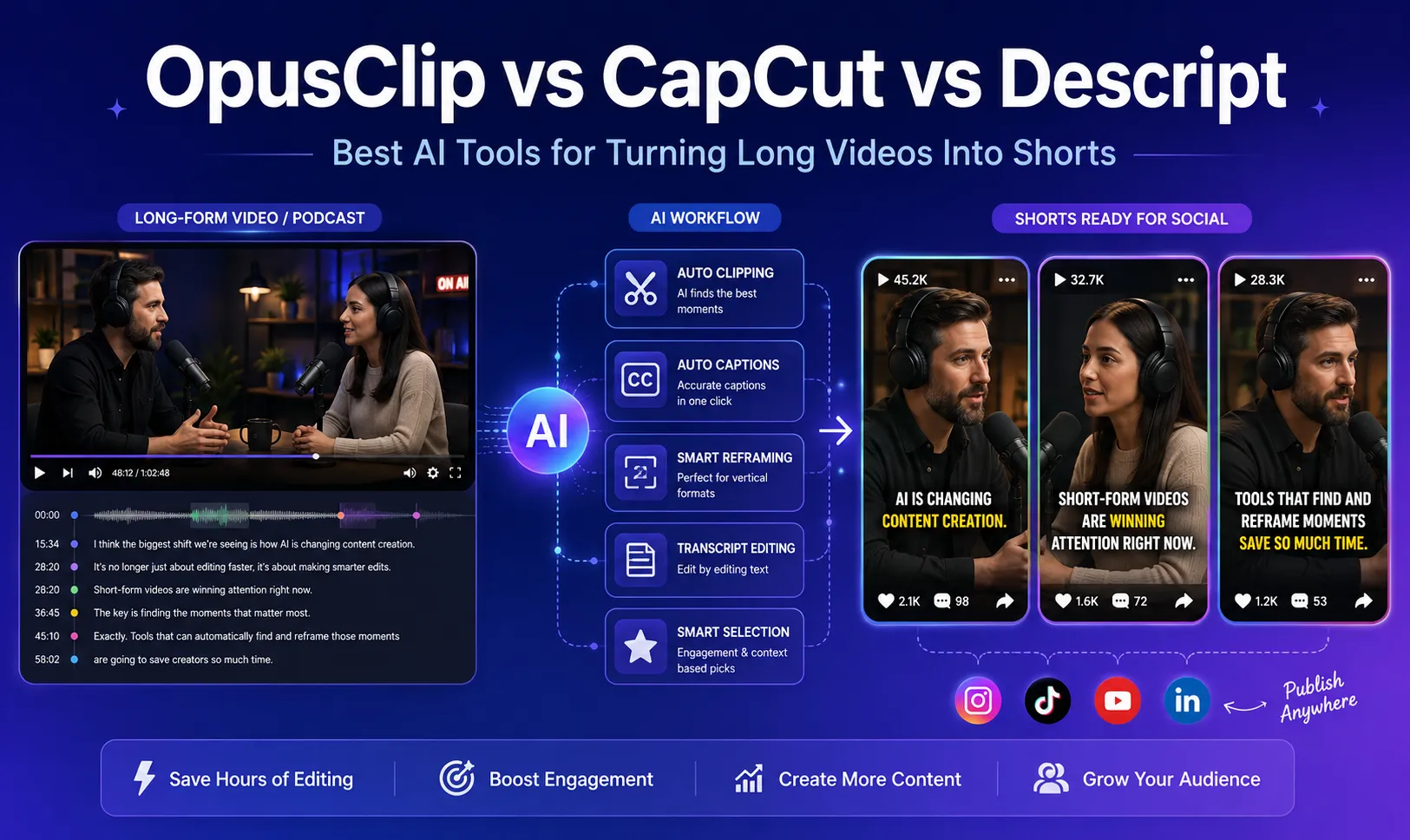
OpusClip vs CapCut vs Descript in 2026: Best AI Tools for Turning Long Videos Into Short
Turning a 30-minute podcast, webinar, interview, or YouTube video into several TikTok clips, Instagram Reels, and YouTube Shorts used to mean hours of manual editing.
You had to find the best moments, cut the timeline, change a horizontal video into a vertical format, keep the speaker inside the frame, add subtitles, remove awkward pauses, and finally export several versions for different platforms.
AI video repurposing tools now automate much of that process.
Three names appear repeatedly when creators look for a faster workflow: OpusClip, CapCut, and Descript.
They overlap in several areas, but they are not really the same type of product.
OpusClip focuses heavily on automatically finding short-form moments inside long videos.
CapCut combines AI automation with a much broader traditional video editor and a large collection of social-media-friendly effects.
Descript approaches editing from another direction: it turns your video or podcast into a transcript and lets you edit the recording almost like a text document.
So which one should you use?
In this guide, we compare OpusClip, CapCut, and Descript based on the workflow that matters most: turning existing long-form content into publishable short videos.
Quick Answer
If you do not want to read the entire comparison, here is the short version:
| Tool | Best For | Main Strength |
|---|---|---|
| OpusClip | Podcasts, interviews, webinars and long videos | Automatically finding and creating short clips |
| CapCut | TikTok, Reels and visually polished social content | Creative control, effects and manual editing |
| Descript | Podcasts, educational videos and talking-head content | Editing video through text and improving spoken audio |
For creators with a large archive of long videos, OpusClip is usually the easiest starting point.
For creators who care more about visual polish and want to manually adjust every detail, CapCut offers more creative control.
For podcasters and educators who spend a lot of time cleaning spoken content, Descript has one of the most convenient editing workflows.
There is also no rule saying you must use only one.
A practical workflow can be:
OpusClip → find clips → CapCut → polish the best clips
or:
Descript → clean the interview → create clips → CapCut → final social styling
The right choice therefore depends more on your bottleneck than on which product has the longest feature list.
Why Long-Form-to-Short AI Tools Matter
A one-hour podcast may contain several moments that would work perfectly as 30-second or 60-second videos.
The problem is finding them.
Traditional editing requires someone to watch or scrub through the entire recording, identify useful sections, cut them, resize the footage and create subtitles.
Doing this once is manageable.
Doing it for every podcast episode, interview or webinar quickly becomes expensive in time.
This is where AI clipping tools are useful.
Modern tools can perform several steps automatically:
-
identify potentially interesting sections;
-
generate shorter clips;
-
convert horizontal video into 9:16 vertical video;
-
track the main speaker;
-
create subtitles;
-
remove pauses or filler words;
-
create multiple clips from one source;
-
prepare the results for social publishing.
The key difference between tools is how much of the decision-making they automate.
Some behave like an assistant that chooses clips for you.
Others behave more like a traditional editor with AI features added on top.
That distinction matters.
How We Evaluated These Tools
This comparison focuses on six practical questions:
-
How easily can the tool turn a long video into several short clips?
-
How much manual editing is still required?
-
How well does it handle vertical reframing?
-
How flexible are the captions and visual styles?
-
How useful are its audio-cleanup features?
-
Which type of creator benefits most from the workflow?
We also checked the current feature sets described in the companies' official product documentation as of August 2026.
One important note: features in AI editing software change quickly. A feature, usage limit, export option or subscription tier available today may change later.
We therefore focus primarily on workflow and product strengths rather than temporary promotional pricing.
1. OpusClip: Best for Automatically Finding Shorts Inside Long Videos
OpusClip is the most specialized product of the three.
Its core job is simple:
Give it long-form content and let AI find clips that may work as short-form videos.
That makes it particularly interesting for:
-
podcast creators;
-
interview channels;
-
webinar publishers;
-
coaches;
-
livestreamers;
-
agencies managing multiple creators;
-
YouTube creators with large content archives.
Instead of manually selecting every timestamp, OpusClip analyzes the source and produces multiple potential clips.
Its current product includes AI clipping, a Virality Score, animated captions, automatic reframing, B-roll options and publishing tools. (Opus)
What Is the Virality Score?
One of OpusClip's most recognizable features is its Virality Score.
The platform assigns generated clips a score intended to estimate their potential as social content.
This should not be treated as a guarantee that a video will go viral.
No software can reliably predict that.
What the score can do is help solve a much simpler problem:
If AI generated 15 clips from one podcast, which clips should I review first?
For creators processing large quantities of content, that type of prioritization can be useful.
Rather than carefully editing every generated clip, you can start with the most promising candidates and reject weak clips early.
OpusClip officially describes its AI curation system as identifying compelling hooks and highlights, while its Virality Score estimates the potential of individual clips.
Auto Reframing
Reframing is another important part of the workflow.
A normal podcast may be recorded in 16:9 with two people sitting on opposite sides of the screen.
Simply cropping the middle of that footage into 9:16 can cut both speakers out.
OpusClip's AI Reframe is designed to detect speakers and moving subjects and adjust the framing for formats including:
-
9:16;
-
1:1;
-
16:9.
This is especially useful when repurposing interview and podcast footage for mobile feeds.
Captions
Captions are generated automatically and can use animated styles rather than traditional static subtitles.
For creators producing large numbers of shorts, this is important because caption styling is one of the repetitive parts of the editing process.
OpusClip currently supports animated captions, customization and multiple languages.
Where OpusClip Is Strongest
OpusClip makes the most sense when your workflow begins with:
“I already have a long video. Please find useful shorts inside it.”
That is different from saying:
“I already know exactly which 42 seconds I want. Help me design the perfect TikTok edit.”
For the second workflow, CapCut may make more sense.
Best for:
-
repurposing long podcasts;
-
processing a large video archive;
-
automatically generating clip candidates;
-
teams that publish frequently;
-
creators who want less timeline editing.
Possible drawback:
Automation also means giving the AI more control over editorial decisions.
A technically good clip is not automatically the clip that best represents your message.
You should still review context, claims and cut points before publishing.
2. CapCut: Best for Creative Control and Social-Media Styling
CapCut occupies a much broader position.
It is not only a long-video-to-short tool.
It is a full video editing environment with traditional timeline editing plus AI-assisted features.
CapCut currently offers a Long Video to Shorts workflow that can automatically identify highlights, generate short clips, resize footage and create captions. Its tool also includes smart cropping and subject tracking for converting horizontal footage into vertical content.
That means the old distinction that “OpusClip automatically cuts videos while CapCut only edits them manually” is no longer completely accurate.
CapCut can automate clipping too.
The difference is that CapCut remains stronger when you want to continue editing after the AI has done the first pass.
Why Creators Like CapCut
Short-form videos often need more than correct subtitles.
Creators may want:
-
text animations;
-
zoom effects;
-
transitions;
-
stickers;
-
overlays;
-
sound effects;
-
music synchronization;
-
custom timing;
-
filters;
-
multiple video layers;
-
manual keyframes.
This is where CapCut feels closer to a conventional editor.
If an automatically generated clip is 80% complete, CapCut gives you many ways to work on the remaining 20%.
Long Video to Shorts
CapCut's current long-to-short tools can analyze long footage, identify highlight moments and generate shorter videos.
It also supports automatic cropping and resizing, including subject tracking when converting content into vertical formats.
For someone who wants both automation and a detailed editor in the same ecosystem, that is a strong combination.
Captions and Visual Style
CapCut has a major advantage for creators whose content depends heavily on presentation.
You can generate automatic captions and then continue customizing their appearance.
That makes CapCut particularly useful for:
-
fast TikTok edits;
-
creator-style subtitles;
-
promotional videos;
-
meme-driven content;
-
visually dense Reels;
-
product videos.
The trade-off is that more control also creates more decisions.
A creator who only wants to upload a podcast and receive usable shorts may find CapCut's wider editing environment more than they need.
Where CapCut Is Strongest
CapCut makes the most sense when your workflow is:
“Help me create the first version, but I want control over the final result.”
Best for:
-
TikTok creators;
-
Instagram Reels;
-
YouTube Shorts;
-
visually styled content;
-
creators who enjoy timeline editing;
-
marketers making short-form ads;
-
anyone who wants automation without giving up manual control.
Possible drawback:
If your main problem is reviewing several hours of podcasts every week, a more specialized clipping-first tool can provide a faster starting point.
3. Descript: Best for Editing Spoken Video Like a Document
Descript solves a different problem.
Instead of making the timeline the center of the editing experience, Descript makes the transcript central.
Import a video or audio recording and Descript transcribes the spoken content.
You can then edit the transcript, and those edits are reflected in the media.
This is particularly useful for content built around speech:
-
podcasts;
-
interviews;
-
tutorials;
-
webinars;
-
online courses;
-
presentations;
-
talking-head videos.
Descript's current AI toolkit includes repurposing long content into clips, video reframing, Studio Sound, filler-word removal and other speech-cleanup tools.
Text-Based Editing
Imagine an interview contains this sentence:
“So, um, today we're going to, you know, talk about AI video editing.”
In a traditional editor, you might locate each unnecessary phrase on the waveform and cut it manually.
In Descript, the transcript is part of the editing interface.
This can make speech-heavy editing feel closer to editing an article than editing a movie.
That is the product's biggest conceptual advantage.
Filler Word Removal
Descript can automatically detect filler words such as “um,” “uh,” and “you know,” then allow the editor to remove or review them.
The current tool can also try to avoid harsh cuts where removing a filler word would damage the surrounding speech.
This is particularly helpful for long interviews where hundreds of small speech corrections would otherwise take significant editing time.
Studio Sound
Audio quality is another major Descript strength.
Studio Sound is designed to improve spoken voice and reduce problems such as background noise and room echo.
For podcasts and educational content, this can matter more than animated captions.
A visually simple video with clear, comfortable audio can often be more useful than a flashy clip with poor sound.
Create Clips
Descript is no longer only a podcast editor.
Its current AI tools also include functionality for repurposing long recordings into shorter content.
This places it closer to OpusClip than it used to be.
The difference is still the workflow.
OpusClip feels primarily like:
Long video → AI finds social clips.
Descript feels more like:
Recording → transcript → clean the content → restructure → create clips.
Where Descript Is Strongest
Best for:
-
podcasters;
-
educators;
-
interview creators;
-
founders making talking-head content;
-
tutorial creators;
-
creators who dislike traditional timeline editing;
-
teams that care strongly about spoken clarity.
Possible drawback:
If your goal is highly stylized TikTok editing with heavy visual effects, CapCut is generally a more natural environment.
OpusClip vs CapCut vs Descript: Feature Comparison
| Feature | OpusClip | CapCut | Descript |
|---|---|---|---|
| Long video → short clips | Excellent | Very Good | Very Good |
| Automatic clip discovery | Excellent | Very Good | Good |
| Vertical auto-reframing | Excellent | Very Good | Good |
| Caption automation | Excellent | Excellent | Very Good |
| Caption customization | Very Good | Excellent | Good |
| Manual visual editing | Good | Excellent | Very Good |
| Podcast editing | Very Good | Good | Excellent |
| Audio cleanup | Good | Very Good | Excellent |
| Text-based editing | Available | Limited compared with Descript | Excellent |
| Social styling | Very Good | Excellent | Good |
| Best use case | Automated repurposing | Final creative editing | Spoken-content editing |
The important point is that there is no universal winner.
The products optimize different stages of content production.
Which Tool Should You Choose?
Choose OpusClip if…
You already publish long-form content and your biggest problem is turning it into many shorts.
A podcast studio producing several episodes every week is a strong example.
The main value is not necessarily making the world's most sophisticated edit.
It is reducing the amount of material a human editor has to review.
Choose CapCut if…
You care about exactly how the final short looks.
You want to change timing, animations, overlays, transitions, captions, music and visual effects yourself.
CapCut is especially attractive when short-form video is the final product rather than simply a repurposed version of longer content.
Choose Descript if…
Most of your content is spoken.
If you regularly edit interviews, podcasts, tutorials or presentations, the transcript-first workflow can remove a lot of friction.
Instead of searching a timeline to find a sentence, you can work directly with the words.
A Better Workflow: Use Two Tools
You do not necessarily need to choose only one platform.
For high-volume content teams, specialized tools can be used at different stages.
Workflow A: Podcast Repurposing
Podcast recording → OpusClip → CapCut → TikTok / Reels / Shorts
Use OpusClip to identify potential moments.
Select the strongest clips.
Then move only those clips into CapCut for detailed visual styling.
This avoids spending 20 minutes polishing a clip that should never have been published.
Workflow B: Educational Content
Raw recording → Descript → short clips → publishing
Use Descript to:
-
clean speech;
-
remove unnecessary sections;
-
improve audio;
-
restructure the explanation.
Then create shorter versions from the cleaned master recording.
Workflow C: Creator-First Shorts
Raw footage → CapCut → final short
If the video was designed to be a short from the beginning, there may be little reason to use a dedicated long-form repurposing platform.
CapCut alone may be enough.
Common Mistakes When Using AI Clip Generators
AI can make editing faster, but blindly publishing everything it generates is usually a mistake.
1. Trusting a “Virality Score” Too Much
A score can help prioritize clips.
It cannot predict audience behavior with certainty.
Topic relevance, timing, distribution, audience fit and the creator's existing reputation still matter.
Treat AI scores as suggestions, not guarantees.
2. Letting AI Remove Important Context
A sentence can sound impressive when separated from the five minutes that came before it.
Before publishing a short clip, check that it does not change the speaker's original meaning.
3. Overusing Animated Captions
Captions can improve readability.
Too many effects can make a video difficult to watch.
Highlight important words rather than turning every word into an animation.
4. Ignoring the Opening Seconds
AI may identify a useful idea but still begin the clip too slowly.
Always review the opening.
Ask a simple question:
If I knew nothing about this creator, would I continue watching?
If not, trim the introduction.
5. Publishing the Same Edit Everywhere
A single vertical video can technically be uploaded to several platforms.
That does not mean the same title, description and context should be used everywhere.
Treat the video as the core asset, then adapt the packaging to each platform.
Final Verdict
There is no single “best AI video editor” for every creator.
There is, however, a best tool for each bottleneck.
OpusClip is the strongest choice when the main problem is finding short-form moments inside long videos.
CapCut is the strongest choice when the final visual edit matters most.
Descript is the strongest choice when the content is driven by speech and the editor wants to work through a transcript rather than a traditional timeline.
For many creators, the most efficient setup is not choosing one winner.
It is combining automation and human judgment.
Let AI identify potential clips.
Let AI generate the first captions and framing.
Then let a human decide:
-
Is the idea actually interesting?
-
Does the clip make sense without context?
-
Is the opening strong enough?
-
Does the video represent the creator accurately?
-
Is it worth publishing?
That final editorial decision is still where human experience matters most.
AI can reduce the repetitive work.
It should not replace the person deciding what is worth saying.
Frequently Asked Questions
Is OpusClip better than CapCut?
It depends on the workflow.
OpusClip is more specialized for automatically turning existing long-form videos into short clips.
CapCut provides a broader editing environment and generally gives creators more control over visual styling and final adjustments.
If you have hours of existing podcasts, start with OpusClip.
If you already know which clip you want to edit, CapCut may be the better choice.
Can CapCut automatically turn long videos into Shorts?
Yes.
CapCut currently provides Long Video to Shorts and AI clipping tools that can identify highlights, create short clips, resize video and generate captions.
Can Descript create short clips from a podcast?
Yes.
Descript's AI tools include features for repurposing longer recordings into short clips in addition to its transcript editing and audio-cleanup capabilities.
Which tool is best for podcast clips?
If your priority is automatically finding potential clips, OpusClip is a strong choice.
If your priority is cleaning and restructuring the podcast before clipping it, Descript is particularly useful.
Many podcast teams could reasonably use both.
Which tool is best for TikTok editing?
For detailed visual styling, effects, transitions, captions and manual control, CapCut is generally the strongest option among these three.
Should AI-generated clips be published without review?
No.
AI can select useful moments, but it can also remove context, choose weak openings or emphasize the wrong part of a conversation.
Every automatically generated clip should receive a human review before publishing.